Click "Add button" and "Add submenu's item's buttons situated on the Vista Buttons Toolbar to create your menu. You can also use "Delete selected item", "Delete submenu's item" and move buttons.
Create your own buttons or use ready to use Templates.
Select vista button or submenu by clicking it and change button appearance for normal and mouse over states and set buttons/submenus link properties and link target attributes.
Save your menu.
JAVA SCRIPT DROP MENU SAMPLE
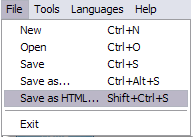
1) File menu
New - to create new project.
Open - to open saved project. You will be asked if you would like to save the current project in the menu buttons creator.
Save - to save current project in the project file (*.xwb). When you save to project file, the directory "ProjectName.xwb.icons" is created, where ProjectName is the name of your project file. This directory contains button icons, .css and .js files of the saved menu.
Save as� - to save current project in the project file (*.xwb) or in the HTML file or to save your project under another name. Choose type from the "File type" list in the "Save as�" dialog and enter project's (new) name. When you save to project file, the directory "ProjectName.xwb.icons" is created, where ProjectName is the name of your project file. This directory contains button icons, .css and .js files of the saved menu. If the menu doesn't have any icons then the directory is not created.
Save as HTML - to save current project into the HTML file (*.html). Project HTML file will be saved then, and the directory created, containing buttons' images. The directory name will be: "YourProjectName-files", where YourProjectName is the name of the HTML file saved. For example: if you enter "Header" in the "Name" field of the "Save as�" dialog, then "Header.html" and directory named "Header-files" will be created.
Exit - to close Vista buttons application.
2) Tools
Export images - to save menu buttons' images as gif-files (*.gif), png-files (*.png) or jpg-files (*.jpg). "Save As�" dialog will appear, where you can either type each button name or leave it unchanged. If you want to save the button images, press "Save". "Save settings" dialog will appear where you can choose image format. Either way (if you don't want the button images to be saved), press "Cancel". This procedure will be repeated for all the menu buttons. When you press "Save", 1 to 3 images are to be saved, depending on the menu type. Their names will be: ButtonName_0.gif - ButtonName_2.gif, where ButtonName is the name you have entered when saving.
ButtonName_0 - corresponds to Normal state.
ButtonName_1 - Hot state image.
ButtonName_2 - corresponds to pressed/clicked state.
Theme editor - to edit/create new themes.
Page insert - you can insert your menu into the existing HTML page.
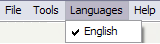
3) Languages menu
The "Languages" menu contains the list of available interface languages. English is the default language setting.
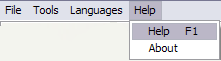
4) Help menu
Help - to read the help.
About -show information about Vista Buttons.
DESCRIPTION
Create both horizontal and vertical menus and submenus with any amount of menus on one page.
Design menus absolutely based on CSS (Cascading Style Sheets). It is possible to apply the personal CSS styles for every elements of the menu.
When the submenu is bigger than the visible page area, the size of submenu will be automatically decreased. To view all the submenu you should use scrollbars
Total control of all menu parameters
Each parameter of a html buttons may be easily changed, allowing you to achieve the required result.
You can set such parameters as direction, size, color, font face, font style, shadow, icons, alignment, links, targets, tooltips, word wrap, and other parameters.
Any change can be undone by pressing "Undo" button.
Css Fade Horizontal Vertical
Professional Look-n-feel
Entirely customizable look-n-feel
JavaScript Drop Menu provides 500+ web buttons, 100 submenu designs, 50 ready-made samples
Vista, XP, Win98, Mac, Aqua buttons, round, glossy, metallic, 3d styles, Web 2.0 style, tab menus, drop down menus will be a breeze!
Create your own templates
Dynamisch Dropdown Software
Creer Un Menu Java Java Script Drop Menu Sample
Not a string of code!
You will not need any skills in javascript and html with JavaScript DropDown Menu. All programming will be completed for you.
There even will be no necessity to edit your html code to insert a completed button-menu. Just point out the place on your page, where you want the buttons to be, and then press "Insert".
RELATED
Dynamic Drop Down Menu - Samples - Deluxe-Tree.com Javascript API functions: 1. Change "Deluxe Tree/Purchase Delete "Samples Gallery/Samples Block 3" item. 6. Hide Show "Deluxe Tree" item info. 3. Show dynamic drop down menu
JavaScriptDrop Down Boxes So, you have been thinking about adding a drop box for people to navigate your page with. One problem ..how is it done? Below is a sample navigation drop box.
XP Style TaskBar - JavascriptDropMenu - Templates XP Style TaskBar - JavascriptDropMenu. Deluxe Menu is cross-frame and cross-browser DHTML Javascriptmenu with a lot of powerful features, flexible parameters and easy
OpenCube: Professional Site Navigation Software Fully functional in JavaScript disabled browsers Create advanced drop downs, trees, mega menus and more! on which direction you mouse over the menu. View Sample
JavaScriptDrop Down Boxes So, you have been thinking about adding a drop box for people to navigate your page with. One problem ..how is it done? Below is a sample navigation drop box.
How To Create JavascriptDropMenu ASP Dynamic DHTML MenuSample --- DHTML Menu, DHTML Drop Down DHTML Menu, JavaScript DHTML Menu, easy yet powerful How To Create JavascriptDropMenu. JavaScriptDrop Down Menu
Drop Down MenuDrop Down Menu 1. Introduction and Sample both the menu bar and the drop down menus when you generate the Javascript
How To Create JavascriptDropMenu ASP Dynamic DHTML MenuSample --- DHTML Menu, DHTML Drop Down DHTML Menu, JavaScript DHTML Menu, easy yet powerful How To Create JavascriptDropMenu. JavaScriptDrop Down Menu
How To Create JavascriptDropMenu ASP Dynamic DHTML MenuSample --- DHTML Menu, DHTML Drop Down DHTML Menu, JavaScript DHTML Menu, easy yet powerful How To Create JavascriptDropMenu. JavaScriptDrop Down Menu
JavaScriptDrop Down Boxes So, you have been thinking about adding a drop box for people to navigate your page with. One problem ..how is it done? Below is a sample navigation drop box.
Drop Down MenusSampleDrop Down Menus Examples. Create superior drop down menus for your Website with Css Sample Tab Javascript Common Style 4 - Html Button Tabs Style 7 - Button Menu
Dynamic Drive DHTML Scripts- AnyLink Drop Down Menu The below sample HTML demonstrates 3 links, one with the menu variable name of the drop down menu <script type="text/javascript"> //anylinkcssmenu.init("menu
Drop Down MenuDrop Down Menu 1. Introduction and Sample both the menu bar and the drop down menus when you generate the Javascript
Dynamic Drop Down Menu - Samples - Deluxe-Tree.com Javascript API functions: 1. Change "Deluxe Tree/Purchase Delete "Samples Gallery/Samples Block 3" item. 6. Hide Show "Deluxe Tree" item info. 3. Show dynamic drop down menu
JavascriptMenu. JavascriptMenu Builder in css javascript, javascriptmenu library, javascript simple menu popup, collapse menujavascript tutorial, 3 submenus javascript, javascriptdrop down menusample jsp,
How to Make a DropMenu To create a drop-menu, copy the code below into your HTML page. Change the Tutorials</option> <option value="/internet/javascript/index.html">JavaScriptSamples
Dynamic Drive DHTML Scripts- AnyLink Drop Down Menu The below sample HTML demonstrates 3 links, one with the menu variable name of the drop down menu <script type="text/javascript"> //anylinkcssmenu.init("menu
Creating a FrontPage Drop-Down Menu with JavaScript Copy and paste the JavaScript code shown in Listing 16 (Complete JavaScript for Drop-Down Menus are included with this article to help you create a working sample with
Drop Down Vertical Javascript Template Samples. MS Office Drop Down Menu; Over Flash, Java, iFrames javascript scrolling menu test theme for the vertical drop down menu. The java script
Dynamic Drop Down Menu - Samples - Deluxe-Tree.com Javascript API functions: 1. Change "Deluxe Tree/Purchase Delete "Samples Gallery/Samples Block 3" item. 6. Hide Show "Deluxe Tree" item info. 3. Show dynamic drop down menu