Create your menu using "Add button" and "Add submenu's item's buttons.
Use various ready to use Templates. Double click on the Template to apply it.
Change button appearance for normal and mouse over states and set buttons/submenus link properties and link target attributes.
Save your menu as project file, as HTML page or insert your menu into the existing HTML page
HOW TO CREATE JSP MENU
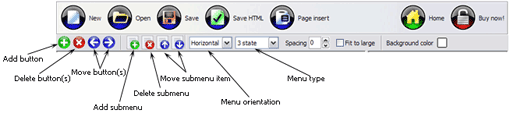
Button builder toolbar
New - to create new project.
Open - to open existing project.
Save - to save current project into the project file (*.xwb).
Save as� - to save current project into the project file (*.xwb) or into the HTML file or to save your project under another name. Choose type from the "File type" list in the "Save as�" dialog.
Page insert - to insert your menu into the existing web-page. "Build the menu into your page" dialog will appear. Click "Browse" button to choose a page you want to insert your menu into. After choosing a page and clicking Ok, the chosen page's HTML code will be opened in the Code field of the dialog.
After that, you can edit your code to prepare the page for the menu insertion. Normally, no coding is required. Then set the cursor to the line you want menu code to be inserted to and click the "Insert" button. The menu code will be inserted into the page. Then you can either save the page or close the dialog without saving by clicking "Save" or "Close" buttons.
Add button - to add website buttons to the menu.
Delete button(s) - to delete selected button(s). Is inactive if no button is selected. Move button(s) - to change selected button's order in the menu. Selected button(s) will be moved one position left/right each time you click one of the Move buttons.
Add submenu's item - to add submenu's item to the menu. Is inactive if no button is selected.
Delete button(s) - to delete selected submenu item(s). Is inactive if no button is selected.
Move submenu's item - to change selected submenu's item order in the menu. Selected item(s) will be moved one position up/down each time you click one of the submenu's item.
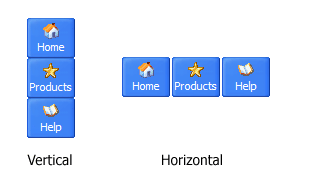
Menu orientation - to select menu orientation (vertical or horizontal). In vertical menu all website buttons are arranged in a column and have the same width. If the menu is horizontal then all its buttons are arranged in a row and have the same height.
Menu type - to select menu type (1-state, 2-state, 3-state and 3-state toggle).
1-state buttons are simple static image buttons. Example:
2-state buttons respond to mouseOver event creating rollover effect. Mouse click doesn't change the button appearance. Example:
3-state buttons support both mouseOver and mouseClick event. Example:
3-state toggle buttons additionally stick in the pressed state after a click. Example:
Spacing - to add space between all buttons.
Fit to large - to make all the menu buttons have the same size. The size will be automatically set to accommodate the biggest text and/or icon in the menu.
Background color - click the square to select Work area's background color.
DESCRIPTION
Good navigation system is an important part of web site success. If people can't find their way around the site, they will rapidly give up looking and go, never to return. So, it's very significant that your website has a neat, fast, and gratifying to the eye navigation. Don't permit your web site visitors to get lost. Try JavaScript Drop Down Menu!
Instant preview
Each change of button-menu appearance is instantly displayed in the Preview Window.
At the same time, you will be able to test how the buttons would respond to the mouse events.
Best Free Web Templates
Instant preview
Each change of button-menu appearance is instantly displayed in the Preview Window.
At the same time, you will be able to test how the buttons would respond to the mouse events.
Css Tree Menu Mouseover
Css Menu Dynamique Glissant How To Create Jsp Menu
High Quality and Professional Results
You don�t have to know HTML, JavaScript, CSS or any other coding languages to make multi-state rollover web buttons, professional cross-browser, search engine friendly DHTML menus.
Vista Web Buttons will generate all necessary images, html, javascripts, css styles automatically!
RELATED
How To CreateMenus Submenus Using Jsp How To CreateMenus Submenus Using Jsp. JavaScript Drop Down Menu is a versatile, ready-made solution that allows professional and amateur web developers to create
Create Dynamic DHTML Menu with JSP Sothink provide perfect Flash animation Maker and other Flash Animation Software, such as SWF Decompiler, SWF Editor, bring you a new Flash world! And DHTML Menu-a
creating dynamic menu in jsp hi, i have to create dynamic menu in jsp. Backend database is Ms SQL server. For eg Menu1 Submenu1 Submenu1.1
Creating Layered Video Backgrounds in DVD Workshop MenusCreating advanced motion menus with layered video looks like it requires a lot of experience in video compositing and special effects, but it is actually quite easy to do
Part 5 Chapter 4 - MenuJSP Programming Note that if you do wish to modify the standard Menu Page, it is recommended that you create your own JSP did not login, return "onload=\"top.location='Menu_Login.jsp
Creating Layered Video Backgrounds in DVD Workshop MenusCreating advanced motion menus with layered video looks like it requires a lot of experience in video compositing and special effects, but it is actually quite easy to do
JavaServer Pages (JSP) and JSTL - Re: creatingmenu from hi, I want to create a menu dynamically using a properties file. All the nodes of the menu are inside the properties file. I have a main page, inside the main page i have
JspMenu Free Download DHTML Menu Builder which enable you to create perfect web menus of all kinds Related Terms for JspMenuJsp Auto Generator, Asp to Jsp Converter, Jsp to
Create Dynamic DHTML Menu with JSP Sothink provide perfect Flash animation Maker and other Flash Animation Software, such as SWF Decompiler, SWF Editor, bring you a new Flash world! And DHTML Menu-a
How To CreateMenu Bar Using Jsp How To CreateMenu Bar Using Jsp. JavaScript Drop Down Menu. The most powerful JavaScript Menu on the Web!
A Custom JSP Tag Library for Dynamic Menus Adjust xmlmenu.jsp and jdbcmenu.jsp to fit your environment. Create a new database table structure and import seed data by running the menu.sql file.
Creating a Sub-Menu in JSP (JSP forum at JavaRanch) This week's book giveaway is in the Java in General forum. We're giving away four copies of Event Processing in Action and have Opher Etzion and Peter Niblett on-line!
How to createmenu bars in jsp? - Yahoo! Answers Best Answer: Embed the markup and styles as usual in the jsp (or, possibly, put the styles in an external style sheet for client-side include). How you lay out the menu is up to you (or
jsp table and drop down menu - JSP i want to create dynamic table and drop down menu from lists. i have 2 questions: 1. for the drop down menu i can run over the list and write the tag inside
JavaServer Pages: A Developer's Perspective JavaServer Pages : A Developer's Perspective JavaServer Pages(JSP) technology provides an easy way to create dynamic web pages and tlds/menuDB.tld" prefix="menu" %>
JavaServer Pages (JSP) and JSTL - Re: creatingmenu from hi, I want to create a menu dynamically using a properties file. All the nodes of the menu are inside the properties file. I have a main page, inside the main page i have
Jsp Dropdown. Web Menu How To I want to make a JSP form that has two drop down menus one for countries and another for cities. Chetan Dorle wrote:Try Ajax you just need to search Ajax code which