QUICK HELP
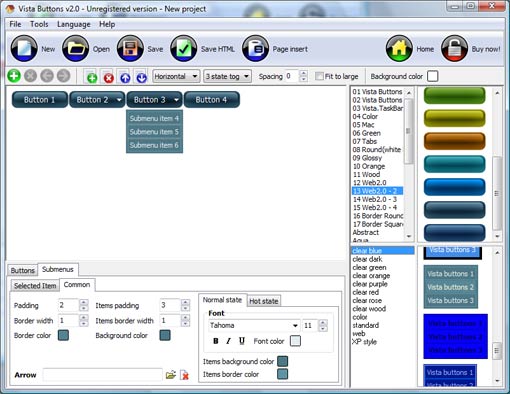
Click "Add button" and "Add submenu's item's buttons to create your menu. Create your own buttons or use ready to use Templates. Select vista button or submenu by clicking it and change button appearance for normal and mouse over states and set buttons/submenus link properties and link target attributes. Save your menu as project file, as HTML page or insert your menu into the existing HTML page
CREATING SUBMENU HTML
Create buttons in theme editor
To open Theme editor right-click "Tools/Theme editor" in the Main menu. Theme editor helps you create your own themes or modify existing ones. To select a button you would like to edit, just lick it in the Themes toolbox.
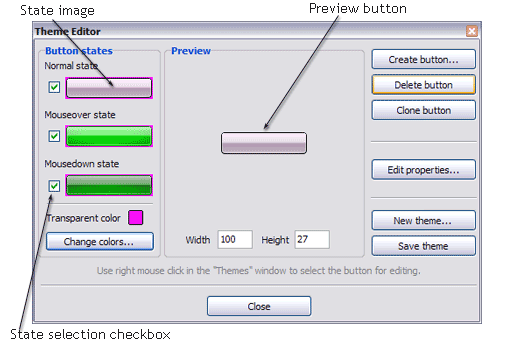
Create button... - to add new button to the current theme. After you click the "Create button" button, the "Create New Button" dialog will appear.
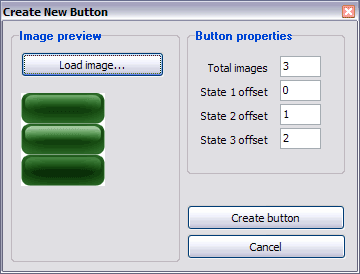
Load image - to open button states image file (*.bmp)
Total images - to define how many button state images are in the opened file. The button states image will then be divided into this number of state images.
State � offset fields - to set the state image for each Normal/Hot state of the button. If you set state offset to 0 then the topmost state image will be used for the state. If you set state offset to 1 then the second state image will be used etc. State 1 corresponds to the Normal state, state 2 - to the Hot state, state 3 - to the Pressed state.
Create button - to add the button to the current theme.
Delete button - to delete the button from the current theme.
Clone button - to create a copy of the button in the current theme.
Edit properties... - to edit the button state images' edge width. After you click the "Edit properties..." button, the "Button properties" toolbox will appear.
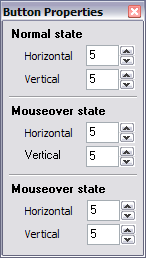
Horizontal and Vertical - to define edge width for each state. Edges are not scaled when you change the button size. Using edges is useful when you would like the button to have border. Then, if the border is within the edges, it won't be scaled.
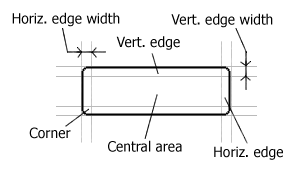
Central area is scaled in both directions. Corners are not scaled. Vertical edges are not scaled in vertical direction. That is, when you change the button height, vertical edges will not be scaled. And vice versa, horizontal edges are not scaled in horizontal direction.
Example: Let's say, we have the following button (size: 50x50):

Let's change it's width to 150:
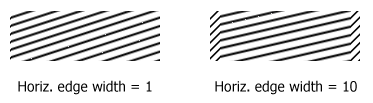
As you can see, in the left image (Horiz. edge width = 1) whole button image was scaled to fit its new size. In the second case (Horiz. edge width = 10) left and right edges of the button were not scaled. Same with the vertical edge width.
Transparent Color - to set the transparent color. When you add new button, transparent color is automatically set to match the color of the top-left corner of the button states image.
New theme... - to create a new theme. "Create New Theme" dialog will appear, where you should enter theme name and special notices (for example your copyright info, email, etc.).
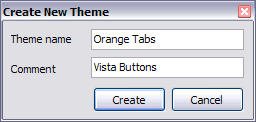
Save theme - to save theme changes.
Close - to close Theme editor.
Change colors... - to exchange web button images colors. After clicking the "Color exchange" button, the "Color exchange" dialog will appear. Select the state(s) you want to be affected by clicking the checkbox next to the state image.
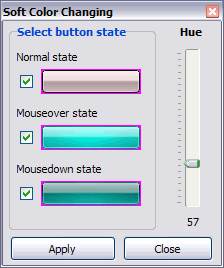
Move slider to find the color you like.
Wight and Height fields - to set the preview button size.
DESCRIPTION
Sub menus dropdown over all the objects on the page (select, flash, object, embed). Design personal styles for any submenu and item. Use images for icons, backgrounds of items. Using images you can create menus entirely based on graphics.
| High Quality and Professional Results |
- You don�t have to know HTML, JavaScript, CSS or any other coding languages to make multi-state rollover web buttons, professional cross-browser, search engine friendly DHTML menus.
- Vista Web Buttons will generate all necessary images, html, javascripts, css styles automatically!
|
Create Context Menu With Javascript | 3-state rollover buttons |
- JavaScript Drop Menu automatically generates images of buttons for normal, mouseover, and click states.
- There is also a feature of creation either static or 2-state buttons.
|
Créer Un Menu Html Tree| Dynamic Html List Menu Creating Submenu Html |
| 3-state rollover buttons |
- Drop Down JavaScript Menu automatically generates images of buttons for normal, mouseover, and click states.
- There is also a feature of creation either static or 2-state buttons.
|
RELATED
Create a basic Horizontal Menu & Submenu using Actions (1) Section 7 : Advanced Techniques - Creating a Horizontal menu and submenu using GoLive Actions. Step-by-step instructions to create an example horizontal menu system.
Create a basic Horizontal Menu & Submenu using Actions (1) Section 7 : Advanced Techniques - Creating a Horizontal menu and submenu using GoLive Actions. Step-by-step instructions to create an example horizontal menu system.
How To Create Html Submenu Script How To Create Html Submenu Script. Keep your Web site clean and focused with Java Script DropDown Menu!
Create submenu help for HTML/CSS [Archive] - WebDeveloper.com [Archive] Create submenu help for HTML/CSS HTML
mm_menu - need help creating a 2nd submenu - Macromedia Dynamic mm_menu - need help creating a 2nd submenu Macromedia Dynamic HTML
How To Create Horizontal Dynamic Menu And Submenu From Database How Can I Create 3d Menu In Html button" and "Add submenu's item's buttons to create your menu. JavaScript [Archive] - Page 131 - WebDeveloper.com How do I add a
How To Create Html Sub Menu How To Create Html Sub Menu. Help visitors find what they search for on your web site! Try Drop Down JavaScript Menu!
How to create submenu HTML? - Yahoo! Answers Best Answer: There are many different ways of getting these menus to work, and an easy solution can be found at the link provided. If you want any help in setting this up, just contact me
Create a basic Horizontal Menu & Submenu using Actions (1) Section 7 : Advanced Techniques - Creating a Horizontal menu and submenu using GoLive Actions. Step-by-step instructions to create an example horizontal menu system.
How to create a pop-up menu in Flash Create the layers Set up the layer: Actions/Labels Create the menu's button Create the top level menu Create the submenu Create invisible button 1 Create invisible button 2
mm_menu - need help creating a 2nd submenu - Macromedia Dynamic mm_menu - need help creating a 2nd submenu Macromedia Dynamic HTML
How To Create Menu Submenu Using Java Script How Can I Create A Submenu In Html How To Create Menu Submenu Using Java Script How To Create Menu Submenu Using Java Script. Enhance your website with java script button!
creating menu and submenu - HTML and CSS please how can I create menu and submenus using html code
Re: create submenu in Gnome From: Brian Truter <brian famvid com> To: fedora-list redhat com; Subject: Re: create submenu in Gnome; Date: Wed, 18 Feb 2004 11:42:32 -0600
problem in creating submenus [Archive] - Dynamic Drive Forums [Archive] problem in creating submenus JavaScript I was searching across the internet for javascript code snippet to create horizontal menu/submenu and found also but
Creating Menus | Android Developers Creating Submenus. A submenu is a menu that the user can open by selecting an item in another menu. You can add a submenu to any menu (except a submenu).
Create submenu help for HTML/CSS [Archive] - WebDeveloper.com [Archive] Create submenu help for HTML/CSS HTML
Re: create submenu in Gnome From: Brian Truter <brian famvid com> To: fedora-list redhat com; Subject: Re: create submenu in Gnome; Date: Wed, 18 Feb 2004 11:42:32 -0600
2.3.�Create You can access this submenu from the Image menu bar through File Create Click and drag to create a rectangular selection in the image
Creating Menus | Android Developers Creating Submenus. A submenu is a menu that the user can open by selecting an item in another menu. You can add a submenu to any menu (except a submenu).
Submenu In Html Template Support Forum thread: Is A Playlist Submenu Possible? Essentially, you have to create a dropdown list in your HTML and use the player's
Submenu Buttons In Html Javascript Template Vista JavaScript Menu provides 500+ web buttons, 100 submenu designs, 6600+ icons, 50 ready-made samples, so you'll create really nice looking website html menus and html
How To Create Html Sub Menu How To Create Html Sub Menu. Help visitors find what they search for on your web site! Try Drop Down JavaScript Menu!
Create submenu help for HTML/CSS - WebDeveloper.com Client-Side Development Create submenu help for HTML/CSS HTML Finding Slow Running Queries in ASE 15; A More Advanced Pie Chart for Analysis Services Data
Free how create html submenu with submenu Download - how create Free download how create html submenu with submenu Files at Software Informer - Have you got tired of clicking folder icons again and again to go to your frequently used
creating menu and submenu - HTML and CSS please how can I create menu and submenus using html code
How to create submenu HTML? - Yahoo! Answers Best Answer: There are many different ways of getting these menus to work, and an easy solution can be found at the link provided. If you want any help in setting this up, just contact me
Drop Down Submenu for Joomla 1.5 - Web Development by Ron Bassett (e.g. set Template Name to "topnav/menu.html"). In addition you need to use Change the Parent Menu Item to the ID of the Parent of the submenu you want to create.
Create Submenu Html. Web Menu How To Create Submenu Html. Improve your website navigation with Javascript Menu Builder! How To Set Iframe
Creating a Submenu in Wordpress | In usability we trust Creating a Submenu in WordPress Outputting the HTML. The last step is to output the actual HTML. Ive chosen
problem in creating submenus [Archive] - Dynamic Drive Forums [Archive] problem in creating submenus JavaScript I was searching across the internet for javascript code snippet to create horizontal menu/submenu and found also but
HTML Basics Tutorial : HTML CSS vertical list menu and submenu Create a Vertical Pop-Up Menu; HTML CSS vertical list menu and submenu; Vertical Stretch Menu; Glossy Vertical Navigation Menu; Vertical number menu; Create Vertical Menu bar with
mm_menu - need help creating a 2nd submenu - Macromedia Dynamic mm_menu - need help creating a 2nd submenu Macromedia Dynamic HTML
How To Create Html Sub Menu How To Create Html Sub Menu. Help visitors find what they search for on your web site! Try Drop Down JavaScript Menu!
Drop Down Submenu for Joomla 1.5 - Web Development by Ron Bassett (e.g. set Template Name to "topnav/menu.html"). In addition you need to use Change the Parent Menu Item to the ID of the Parent of the submenu you want to create.
creating menu and submenu - HTML and CSS please how can I create menu and submenus using html code
HTML Basics Tutorial : HTML CSS vertical list menu and submenu Create a Vertical Pop-Up Menu; HTML CSS vertical list menu and submenu; Vertical Stretch Menu; Glossy Vertical Navigation Menu; Vertical number menu; Create Vertical Menu bar with
Create submenu help for HTML/CSS - WebDeveloper.com Client-Side Development Create submenu help for HTML/CSS HTML Finding Slow Running Queries in ASE 15; A More Advanced Pie Chart for Analysis Services Data
How To Create Html Sub Menu How To Create Html Sub Menu. Help visitors find what they search for on your web site! Try Drop Down JavaScript Menu!
How To Create Menu Submenu Using Java Script How Can I Create A Submenu In Html How To Create Menu Submenu Using Java Script How To Create Menu Submenu Using Java Script. Enhance your website with java script button!