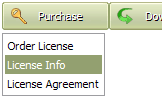
Click "Add button" and "Add submenu's item's buttons situated on the Vista Buttons Toolbar to create your menu. You can also use "Delete selected item", "Delete submenu's item" and move buttons.
Create your own buttons or use ready to use Templates.
Select vista button or submenu by clicking it and change button appearance for normal and mouse over states and set buttons/submenus link properties and link target attributes.
Save your menu.
VERTICAL CSS MENU WITH SUBMENU
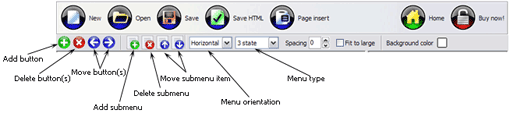
Button builder toolbar
New - to create new project.
Open - to open existing project.
Save - to save current project into the project file (*.xwb).
Save as� - to save current project into the project file (*.xwb) or into the HTML file or to save your project under another name. Choose type from the "File type" list in the "Save as�" dialog.
Page insert - to insert your menu into the existing web-page. "Build the menu into your page" dialog will appear. Click "Browse" button to choose a page you want to insert your menu into. After choosing a page and clicking Ok, the chosen page's HTML code will be opened in the Code field of the dialog.
After that, you can edit your code to prepare the page for the menu insertion. Normally, no coding is required. Then set the cursor to the line you want menu code to be inserted to and click the "Insert" button. The menu code will be inserted into the page. Then you can either save the page or close the dialog without saving by clicking "Save" or "Close" buttons.
Add button - to add website buttons to the menu.
Delete button(s) - to delete selected button(s). Is inactive if no button is selected. Move button(s) - to change selected button's order in the menu. Selected button(s) will be moved one position left/right each time you click one of the Move buttons.
Add submenu's item - to add submenu's item to the menu. Is inactive if no button is selected.
Delete button(s) - to delete selected submenu item(s). Is inactive if no button is selected.
Move submenu's item - to change selected submenu's item order in the menu. Selected item(s) will be moved one position up/down each time you click one of the submenu's item.
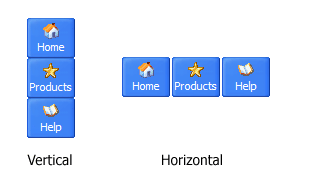
Menu orientation - to select menu orientation (vertical or horizontal). In vertical menu all website buttons are arranged in a column and have the same width. If the menu is horizontal then all its buttons are arranged in a row and have the same height.
Menu type - to select menu type (1-state, 2-state, 3-state and 3-state toggle).
1-state buttons are simple static image buttons. Example:
2-state buttons respond to mouseOver event creating rollover effect. Mouse click doesn't change the button appearance. Example:
3-state buttons support both mouseOver and mouseClick event. Example:
3-state toggle buttons additionally stick in the pressed state after a click. Example:
Spacing - to add space between all buttons.
Fit to large - to make all the menu buttons have the same size. The size will be automatically set to accommodate the biggest text and/or icon in the menu.
Background color - click the square to select Work area's background color.
DESCRIPTION
Sub menus dropdown over all the objects on the page (select, flash, object, embed).
Design personal styles for any submenu and item.
Use images for icons, backgrounds of items. Using images you can create menus entirely based on graphics.
High Quality and Professional Results
You don�t have to know HTML, JavaScript, CSS or any other coding languages to make multi-state rollover web buttons, professional cross-browser, search engine friendly DHTML menus.
Vista Web Buttons will generate all necessary images, html, javascripts, css styles automatically!
Animated Treeview Menu Javascript Scroller
Vista-style menus
Web menus, which are created by Java Script Drop Down Menu, exactly correspond with Windows Vista graphic interface components. That is why the visitors of your site will not have to spend their time in order to familiarize with the unusually-looking navigation. Nevertheless, you are not limited by the standard Windows themes, and you will be able to create your own original buttons.
Barcode Example Code Javascript Web
Drag And Drop In Javascript Page Sample Vertical Css Menu With Submenu
Easy, quick, professional
Its very easy to create professional high-quality web buttons with the help of JavaScript DropDown Menu. Once installed you�ll be making buttons for your web site with no programming or drawing required.
CSS Tabs :: Adam Kalsey CSS Tabs with Submenus. This is a way of accomplishing tabs and subnavigation IE 4 on Windows shows the menus as a vertical list. IE 5.0 has some slight isues with the
Two CSSverticalmenu with show/hide effects Two CSSverticalmenu with show/hide effects have ever see!! how to make the verticalmenu can If I'm using this as a multi-level menu, how do I get the open submenu
Editing horizontal CSS dropdown menus This support page is for horizontal CSS drop menus only You can edit all the menu and submenu titles (names) and See Also VerticalCSSMenuMenu Editing Drop Menus
30 Free CSS Based Navigation Menus | cssJuice Drop-Down Menus, Horizontal Style create visually appealing drop-downs by using structured HTML and simple CSS. Horizontal and VerticalCSSMenu Tutorial
Sound Support - Javascript VerticalMenu - Samples iPhone 2 Template dropdown submenu iPhone 2 Template html cssmenu iPhone 2 Template mouseover Sound Support - Javascript VerticalMenu. You can add sound effects
Digg Like CssVerticalmenu This tutorial explains how to implement a simple verticalmenu digg-like using CSS and and this is the code for the sub-menu: #middlebar ul .submenu { border:solid 1px
Horizontal menu with Horizontal submenu it to be ALL CSS horizontal menus - say for example "Home", "About us", "Products", etc..it displays a clickable "horizontal submenu" just below it, (Not Vertical
Stu Nicholls | CSSplay | CSS only menusVertical slide menu A vertical push-down menu using just CSS. Definition List Definition list menu Styling a definition list with curved corners. A drop-down definition list
IE6/7 adding vertical indent to horizontal <ul> menu #subMenu ul ul ul {display: none;} CSS (conditional comments for IE 6/7) problem is both IE 6/7 add a ~5px vertical indent to the menu items displayed in this submenu.
Two CSSverticalmenu with show/hide effects Two CSSverticalmenu with show/hide effects have ever see!! how to make the verticalmenu can If I'm using this as a multi-level menu, how do I get the open submenu
Stu Nicholls | CSSplay | CSS only menusVertical slide menu A vertical push-down menu using just CSS. Definition List Definition list menu Styling a definition list with curved corners. A drop-down definition list
How To Create CssVertical Multi Level Menus HOW TO CREATE CSSVERTICAL MULTI LEVEL MENUS. Let's assign text to the subitems. Select first item in the submenu by clicking it and then enter text in the "Text" field
CSS Tutorials: CSS Lists, CSS Navigation Bar, CSSMenusmenus, flyout menus, CSS lists with the markup and CSS on how to do it for both vertical with a helpful IE6 CSS fix for when the submenu is longer than the main menu.
Two CSSverticalmenu with show/hide effects Two CSSverticalmenu with show/hide effects have ever see!! how to make the verticalmenu can If I'm using this as a multi-level menu, how do I get the open submenu
Editing horizontal CSS dropdown menus This support page is for horizontal CSS drop menus only You can edit all the menu and submenu titles (names) and See Also VerticalCSSMenuMenu Editing Drop Menus
Free CSSMenus and Techniques CSS only vertical sliding menu does require that all the sublevel lists are the same height irrespective of the number of submenu items. If they were different heights
Two CSSverticalmenu with show/hide effects Two CSSverticalmenu with show/hide effects have ever see!! how to make the verticalmenu can If I'm using this as a multi-level menu, how do I get the open submenu
Editing horizontal CSS dropdown menus This support page is for horizontal CSS drop menus only You can edit all the menu and submenu titles (names) and See Also VerticalCSSMenuMenu Editing Drop Menus
CSS Tutorials: CSS Lists, CSS Navigation Bar, CSSMenusmenus, flyout menus, CSS lists with the markup and CSS on how to do it for both vertical with a helpful IE6 CSS fix for when the submenu is longer than the main menu.
CSSVertical Pop Out Menu <li class="submenu"><a href="#">� Link</a> <ul class="level2"> <li><a href From: Out here on the raggedy edge Status: offline : RE: CSSVertical Pop Out Menu - 4/9/2006
Two CSSverticalmenu with show/hide effects Two CSSverticalmenu with show/hide effects have ever see!! how to make the verticalmenu can If I'm using this as a multi-level menu, how do I get the open submenu