Click "Add button" and "Add submenu's item's buttons to create your menu.
You can use ready to use Templates. To do it just select theme you like in the "Button themes" and "Submenu themes" list. Then you can browse this theme's button backgrounds. When you find a button background or submenu theme you like, double-click it to apply.
Select vista button or submenu by clicking it and change button appearance for normal and mouse over states and set buttons/submenus link properties and link target attributes.
Save your menu as project file, as HTML page or insert your menu into the existing HTML page
JAVASCRIPT DROPDOWN MENUS TUTORIALS
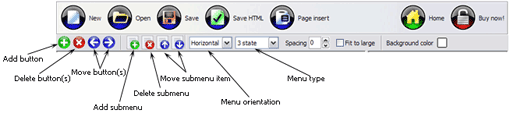
Button builder toolbar
New - to create new project.
Open - to open existing project.
Save - to save current project into the project file (*.xwb).
Save as� - to save current project into the project file (*.xwb) or into the HTML file or to save your project under another name. Choose type from the "File type" list in the "Save as�" dialog.
Page insert - to insert your menu into the existing web-page. "Build the menu into your page" dialog will appear. Click "Browse" button to choose a page you want to insert your menu into. After choosing a page and clicking Ok, the chosen page's HTML code will be opened in the Code field of the dialog.
After that, you can edit your code to prepare the page for the menu insertion. Normally, no coding is required. Then set the cursor to the line you want menu code to be inserted to and click the "Insert" button. The menu code will be inserted into the page. Then you can either save the page or close the dialog without saving by clicking "Save" or "Close" buttons.
Add button - to add website buttons to the menu.
Delete button(s) - to delete selected button(s). Is inactive if no button is selected. Move button(s) - to change selected button's order in the menu. Selected button(s) will be moved one position left/right each time you click one of the Move buttons.
Add submenu's item - to add submenu's item to the menu. Is inactive if no button is selected.
Delete button(s) - to delete selected submenu item(s). Is inactive if no button is selected.
Move submenu's item - to change selected submenu's item order in the menu. Selected item(s) will be moved one position up/down each time you click one of the submenu's item.
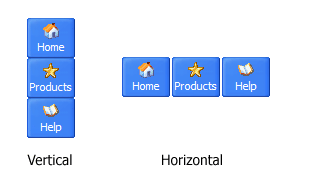
Menu orientation - to select menu orientation (vertical or horizontal). In vertical menu all website buttons are arranged in a column and have the same width. If the menu is horizontal then all its buttons are arranged in a row and have the same height.
Menu type - to select menu type (1-state, 2-state, 3-state and 3-state toggle).
1-state buttons are simple static image buttons. Example:
2-state buttons respond to mouseOver event creating rollover effect. Mouse click doesn't change the button appearance. Example:
3-state buttons support both mouseOver and mouseClick event. Example:
3-state toggle buttons additionally stick in the pressed state after a click. Example:
Spacing - to add space between all buttons.
Fit to large - to make all the menu buttons have the same size. The size will be automatically set to accommodate the biggest text and/or icon in the menu.
Background color - click the square to select Work area's background color.
DESCRIPTION
Use images for backgrounds of submenus and items, icons, arrows. Using web images you can create menus completely based on graphics.
Design both horizontal and vertical menus and submenus with any amount of menus on a single page.
Place any HTML code inside the menu item - be it a flash-object, form, picture, or text. This ability lets you to build various menus of any complexity.
Not a string of code!
You will not need any skills in javascript and html with JavaScript DropDown Menu. All programming will be completed for you.
There even will be no necessity to edit your html code to insert a completed button-menu. Just point out the place on your page, where you want the buttons to be, and then press "Insert".
Css Vertical Tabbed Like Menu
Professional Look-n-feel
Entirely customizable look-n-feel
Drop Down JS Menu provides 500+ web buttons, 100 submenu designs, 50 ready-made samples
Vista, XP, Win98, Mac, Aqua buttons, round, glossy, metallic, 3d styles, Web 2.0 style, tab menus, drop down menus will be a breeze!
Create your own templates
Css Flat Drop Down Style
Dhtml Tab Control Styles Javascript Dropdown Menus Tutorials
Total control of all menu parameters
Each parameter of a html buttons may be easily changed, allowing you to achieve the required result.
You can set such parameters as direction, size, color, font face, font style, shadow, icons, alignment, links, targets, tooltips, word wrap, and other parameters.
Any change can be undone by pressing "Undo" button.
RELATED
Javascripttutorials - Drop DownMenusJavascripttutorials / Miscellaneous - Drop DownMenus - Drop downmenus are very useful for squeezing a lot of options into a small space. By using the Javascript
A Simple JavaScriptDrop-downMenu Shows you how to use JavaScript and a SELECT list to create a simple drop-down navigation menu for your website. In this tutorial we're going to design a simple menu
MenusTutorials - JavaScriptTutorials > Programming > JavaScript: MenusDrop downmenu done in JavaScript: Simple but easy to configure drop downmenu done in
Javascript Navigation Drop DownMenuTutorialTutorial Displaying 1 - 50 of about 3277 Related Tutorials. jQuery Drop DownMenu jQuery Drop DownMenu jQuery Drop DownMenu ; In this JQuery tutorial we will develop a
Javascript Navigation Simple Drop-DownMenuTutorial This clean-looking menu is very simple to implement and can be placed anywhere on a page. Adding or deleting levels is easy to do. The menu is created without tables
Drop DownMenuTutorial | JavaScript Navigation Drop DownMenuTutorial. JavaScript Navigation from Hot Scripts. This is a tutorial which creates a simple cross-browser drop-downmenu system in JavaScript. Tested in IE
MenusTutorials - JavaScriptTutorials > Programming > JavaScript: MenusDrop downmenu done in JavaScript: Simple but easy to configure drop downmenu done in
Drop downmenu in Flash This tutorial will show you how to create a simple drop downmenu. You will also learn how to design it, how JavaScript ; Css & XHTML ; 3D ; Php ; Illustrator ; Fireworks
JavaScriptDrop DownMenuTutorials Featured Photoshop templates - professional ready to use designs for your next project View all templates
Javascript Multi Column Dropdownmenu Hi All I am looking for some example/tutorial for Javascript Multi Column Dropdownmenu, if you check Microsoft Corporation and mouseOver first link "windows" you can
JavaScriptDropdownMenuJavascriptdropdownmenu, sometimes referred to as a Jump Menu because it jumps to the HTML/MARKUP. HTML Tutorial; HTML Codes; HTML Tags; MySpace Codes; XML Tutorial
Javascripttutorials - Drop DownMenusJavascripttutorials / Miscellaneous - Drop DownMenus - Drop downmenus are very useful for squeezing a lot of options into a small space. By using the Javascript
Drop DownMenuTutorial | JavaScript Navigation Drop DownMenuTutorial. JavaScript Navigation from Hot Scripts. This is a tutorial which creates a simple cross-browser drop-downmenu system in JavaScript. Tested in IE
MenusTutorials - JavaScriptTutorials > Programming > JavaScript: MenusDrop downmenu done in JavaScript: Simple but easy to configure drop downmenu done in
JavaScriptDropdownMenuJavascriptdropdownmenu, sometimes referred to as a Jump Menu because it jumps to the HTML/MARKUP. HTML Tutorial; HTML Codes; HTML Tags; MySpace Codes; XML Tutorial
JavaScriptdrop downmenu using Mootools 1.2 MooTools tutorial on how to develop a very simple yet powerful single level drop downmenu. CSS and JavaScript provided with explanations and downloadable example.
JavaScriptdrop downmenu using Mootools 1.2 MooTools tutorial on how to develop a very simple yet powerful single level drop downmenu. CSS and JavaScript provided with explanations and downloadable example.
The JavaScript Source: Forms : Auto Drop Down Site FAQ About JSS JavaScript Forum JavaScriptTutorial Friends of JSS I'm a some-what beginner at web-design and my client wants a auto-drop downmenu.
JavaScript Context MenuTutorial The relevant events are the body's onMouseDown and onContextMenu. The first is required in order to hide our custom context menu at the proper time.
MenusTutorials - JavaScriptTutorials > Programming > JavaScript: MenusDrop downmenu done in JavaScript: Simple but easy to configure drop downmenu done in