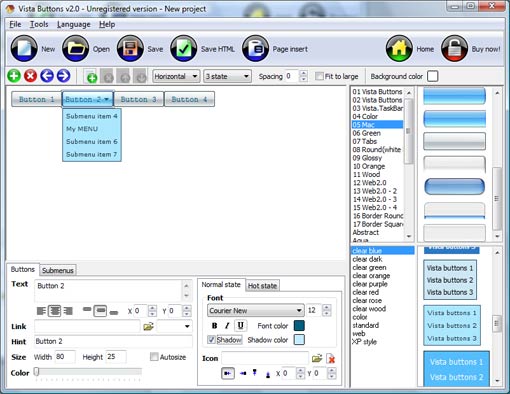
Click "Add button" and "Add submenu's item's buttons to create your menu.
You can use ready to use Templates. To do it just select theme you like in the "Button themes" and "Submenu themes" list. Then you can browse this theme's button backgrounds. When you find a button background or submenu theme you like, double-click it to apply.
Select vista button or submenu by clicking it and change button appearance for normal and mouse over states and set buttons/submenus link properties and link target attributes.
Save your menu as project file, as HTML page or insert your menu into the existing HTML page
HORIZONTAL MENU SCRIPT
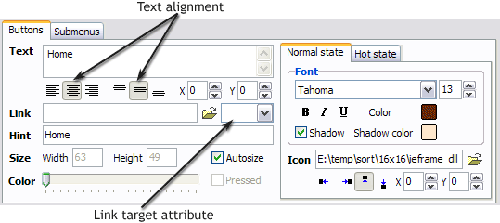
Properties of play button This toolbox is for adjusting the buttons' properties. You can adjust one single button or a group of web page buttons selected with Ctrl/Shift keys at once.
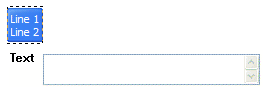
Text - type the button text here. If you want the button to have several lines of text just press "Enter" after typing each line.
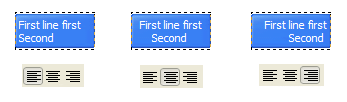
Text alignment - defines text alignment inside the button.
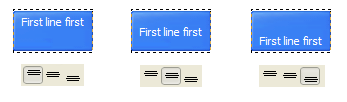
Text offset - text offset in relative coordinates. For more precise text position adjustment.
Link - the link that is to be opened when user clicks the button. For example: http://www.vista-buttons.com. You can also click "Open" icon to the left of the "Link" field to select the page you want to link to.
Link target attribute - link behavior adjustment. Link target attribute tells web-browser where to open the linked page. This attribute represents the Target attribute of the link (<a> tag in HTML). You can either enter your target value in the field or choose from the predefined attribute values in the list.
If you enter your own value, it must be a window or a frame name. Note, that names are case-sensitive. The linked document will then be opened in that window/frame.
Predefined attribute values:
_blank - Browser creates a new window for the linked page.
_parent - Linked page replaces the current frame's framesetting page (if one exists; otherwise, it acts like _self).
_self - Linked page replaces the current page in its window or frame.
_top - Linked page is to occupy the entire browser window, replacing any and all framesets that may be loaded (acts like _self if there are no framesets defined in the window)
If you leave the field clean then the linked page will be opened in the same browser window.
Hint - specifies the tooltip that is shown when you hold the mouse over the button for a few seconds.
Autosize - defines whether the button size is set automatically to accommodate all its contents or not. If not, you should enter the button size manually in the "Width" and "Height" fields.
Width, Height - if "Autosize" property is off then you can enter the button size in these fields.
Pressed - this property is disabled unless your menu type is "3-state toggle". If the menu type is "3-state toggle" and the property is set then the button will be displayed as pressed. Note, that only one button in the menu can be "pressed" at a time.
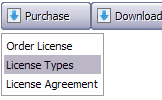
In the example below, the "Download" web page buttons Pressed property is set.
Color - move slider to change selected buttons' colors.
DESCRIPTION
Good navigation is an important step to website success. If people can't find their way around the site, they will quickly give up looking and leave, never to return. So, it's absolute vital that your website has a fast, neat, and eye-pleasing navigation. Don't allow your website visitors to get lost. Try JavaScript DropDown Menu!
Total control of all menu parameters
Each parameter of a html buttons may be easily changed, allowing you to achieve the required result.
You can set such parameters as direction, size, color, font face, font style, shadow, icons, alignment, links, targets, tooltips, word wrap, and other parameters.
Any change can be undone by pressing "Undo" button.
Ajax Moving Menus
Total control of all menu parameters
Each parameter of a html buttons may be easily changed, allowing you to achieve the required result.
You can set such parameters as direction, size, color, font face, font style, shadow, icons, alignment, links, targets, tooltips, word wrap, and other parameters.
Any change can be undone by pressing "Undo" button.
Css Boton 3 Estados
Einfaches Pulldownmenü Css Horizontal Menu Script
Seamless Integration
Visible over flash, select boxes, iframes, java applets
Multiple menus on the same page
Amicable to other scripts and css styles
Any HTML code can be used inside menu items
RELATED
Horizontal Flash Menu Wizard Horizontal Flash Menu Wizard is a Windows compatible script that allows you to design your horizontal site navigation menu in a few minutes and instantly see the results.
Horizontal Flash Menu Wizard Horizontal Flash Menu Wizard is a Windows compatible script that allows you to design your horizontal site navigation menu in a few minutes and instantly see the results.
HorizontalMenu - DownloadJavascripts.com Checkout for HorizontalMenu category at DOWNLOADJAVASCRIPTS.com. A comprehensive resource of: DHTML, JAVASCRIPTS, AJAX, JQUERY, YUI, WEB 2.0 etc.
Light Weight Multi Level Menu | CSS Creator Apart from the css you should wrapp the horizontalmenu in an absolutely positioned div with a high z-index so the menu is above any page content.
Saratoga-Weather.org - Scripts - PHP/CSS Menu CSS horizontal drop-down menuscript package (V1.02 -24-Jul-2010) download [ see version history] Issues with other scripts/applets . This menu system is DHTML-based.
HorizontalMenu | Flash Fla Archives HorizontalMenu. Flash Fla Archives from Hot Scripts. A basic horizontal Flash menu. Easy to change text of menu items.and you can adjust it to fit any background.
SD-Menu (Horizontal Version) | JavaScript Menus SD-Menu (Horizontal Version). JavaScript Menus from Hot Scripts. SD-Menu v1.0 is an easy-to-use and completely customizable hierarchical horizontal navigation menu that
Dynamic Drive CSS Library- SuckerTree HorizontalMenu SuckerTree HorizontalMenu is a CSS and DOM hybrid menu that's list of a few pixels underneath it if you add 3 or more sub-menus. Is this a problem with the script
SimplytheBest AJAX & DHTML menuscripts PEN99 Horizontal dropdown menu A rollover button script with stylish dropdown menus. You can include any HTML code inside the dropdown menus. By: PEN99
HorizontalMenu | Ajax Updates Tags: flickr like menu, flickr menu, flickr menuscript, horizon menuscript, HorizontalMenu, menuscript, simple horizontalmenu, simple menu
Horizontal Drop Down Menu A horizontal drop down menuscript which uses Javascript and CSS. When the mouse pointer is moved over a link a further set of links is revealed.
[UDM] Extensions: HorizontalMenus <!-- horizontalmenus extension --> <script type= "text/javascript" src= "/udm-resources/udm-x-horizontal.js" > </script > Then to re-orient the menu items, add the following CSS to
Light Weight Multi Level Menu | CSS Creator Apart from the css you should wrapp the horizontalmenu in an absolutely positioned div with a high z-index so the menu is above any page content.
Curved HorizontalMenu. Css Template. Free Download This horizontalmenu shows how straight lines can be replaced with any shape you wish. The only draw back with this css script is that the width of each button cannot be
Saratoga-Weather.org - Scripts - PHP/CSS Menu CSS horizontal drop-down menuscript package (V1.02 -24-Jul-2010) download [ see version history] Issues with other scripts/applets . This menu system is DHTML-based.
Dynamic Drive CSS Library- SuckerTree HorizontalMenu SuckerTree HorizontalMenu is a CSS and DOM hybrid menu that's list of a few pixels underneath it if you add 3 or more sub-menus. Is this a problem with the script
SimplytheBest AJAX & DHTML menuscripts PEN99 Horizontal dropdown menu A rollover button script with stylish dropdown menus. You can include any HTML code inside the dropdown menus. By: PEN99
Horizontal Drop Down Menu A horizontal drop down menuscript which uses Javascript and CSS. When the mouse pointer is moved over a link a further set of links is revealed.
Horizontal Flash Menu Wizard Horizontal Flash Menu Wizard is a Windows compatible script that allows you to design your horizontal site navigation menu in a few minutes and instantly see the results.




 Text - type the button text here. If you want the button to have several lines of text just press "Enter" after typing each line.