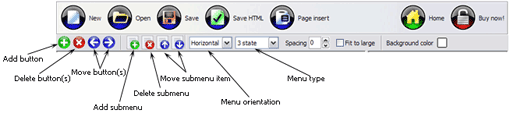
Save your project file. To save project just click "Save" button on the Toolbar or select "Save" or "Save As�" in the Main menu.
Save your menu in the HTML format. To do it click "Save HTML" button on the Toolbar or select "File/Save as HTML..." in the Main menu.
Insert your menu into the existing HTML page. To do so, click "Page insert" button on the website buttons Toolbar.
HORIZONTAL DROP DOWN NAVIGATION MENU CODE
Button builder toolbar
New - to create new project.
Open - to open existing project.
Save - to save current project into the project file (*.xwb).
Save as� - to save current project into the project file (*.xwb) or into the HTML file or to save your project under another name. Choose type from the "File type" list in the "Save as�" dialog.
Page insert - to insert your menu into the existing web-page. "Build the menu into your page" dialog will appear. Click "Browse" button to choose a page you want to insert your menu into. After choosing a page and clicking Ok, the chosen page's HTML code will be opened in the Code field of the dialog.
After that, you can edit your code to prepare the page for the menu insertion. Normally, no coding is required. Then set the cursor to the line you want menu code to be inserted to and click the "Insert" button. The menu code will be inserted into the page. Then you can either save the page or close the dialog without saving by clicking "Save" or "Close" buttons.
Add button - to add website buttons to the menu.
Delete button(s) - to delete selected button(s). Is inactive if no button is selected. Move button(s) - to change selected button's order in the menu. Selected button(s) will be moved one position left/right each time you click one of the Move buttons.
Add submenu's item - to add submenu's item to the menu. Is inactive if no button is selected.
Delete button(s) - to delete selected submenu item(s). Is inactive if no button is selected.
Move submenu's item - to change selected submenu's item order in the menu. Selected item(s) will be moved one position up/down each time you click one of the submenu's item.
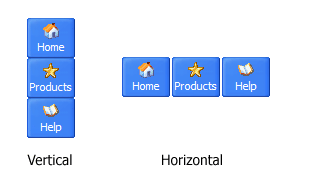
Menu orientation - to select menu orientation (vertical or horizontal). In vertical menu all website buttons are arranged in a column and have the same width. If the menu is horizontal then all its buttons are arranged in a row and have the same height.
Menu type - to select menu type (1-state, 2-state, 3-state and 3-state toggle).
1-state buttons are simple static image buttons. Example:
2-state buttons respond to mouseOver event creating rollover effect. Mouse click doesn't change the button appearance. Example:
3-state buttons support both mouseOver and mouseClick event. Example:
3-state toggle buttons additionally stick in the pressed state after a click. Example:
Spacing - to add space between all buttons.
Fit to large - to make all the menu buttons have the same size. The size will be automatically set to accommodate the biggest text and/or icon in the menu.
Background color - click the square to select Work area's background color.
DESCRIPTION
Good navigation system is an important part of web site success. If people can't find their way around the site, they will rapidly give up looking and go, never to return. So, it's very significant that your website has a neat, fast, and gratifying to the eye navigation. Don't permit your web site visitors to get lost. Try JavaScript Drop Menu!
Seamless Integration
Visible over flash, select boxes, iframes, java applets
Multiple menus on the same page
Amicable to other scripts and css styles
Any HTML code can be used inside menu items
Drag And Drop In Java Web Applications Gui Design
3-state rollover buttons
JavaScript DropDown Menu automatically generates images of buttons for normal, mouseover, and click states.
There is also a feature of creation either static or 2-state buttons.
Dhtml Dropdown Menus
Bash Script Dropdown Menu Horizontal Drop Down Navigation Menu Code
Instant preview
Each change of button-menu appearance is instantly displayed in the Preview Window.
At the same time, you will be able to test how the buttons would respond to the mouse events.
CSS DownMenus - Horizontal and Vertical CSS DropDownMenus CSS Navigation, Fluid & Accessible Sample HTML code. 1. <ul> 2. <li><h2>CSS DropDownMenus</h2> 3. href="#">Example HorizontalDrop & Pop Menu</a
Dropdown Menu CSS Generator Part of dropdownmenu di Am I missing some restyled Suckerfish dropdown navigation above. You can copy and paste the CSS generated from the box further down the
Dhtml DropDownMenus Template HorizontalDropDownMenu Cross Frame; Menus Para Paginas Say I want to include my navigationmenu which has dhtml dropdownmenus. How would I include that code?
Free CSS Drop-DownMenu Framework - LWIS.NET Thus creating a new css drop-downmenu means improved css drop-downmenu; MTV.com horizontal css drop-downmenu I wrapped the code of the menu into a and the Content
30 Free CSS Based NavigationMenus | cssJuice DropDown Llama Menu cool pink hover effect. Inline Menu using image replacement; Navigation Matrix Reloaded; CSS Library Horizontal CSS Menus a bulk of CSS menu by
A List Apart: Articles: Suckerfish Dropdowns the first level of list items will make up a horizontalmenu bar from which the second level lists will dropdown. Code; Content; Culture; Design; Process; User Science
Dhtml DropDownMenus Template HorizontalDropDownMenu Cross Frame; Menus Para Paginas Say I want to include my navigationmenu which has dhtml dropdownmenus. How would I include that code?
SharePoint Drop-downMenus (MOSS07) by menu tabs in the sites horizontalmenu. The News tab includes drop-down home page (click on Sites in the horizontalnavigation Enter the code you see:
Horizontal CSS Dropdown Menus This CSS dropdownmenu has horizontalmenus them look more like the navigation Andrea was looking for. The code I found your horizontaldropdown which I think
HorizontalDropDownMenuNavigation CSS/JavaScript DropDownMenu. Last Edited: 2009-04-15. A horizontaldropdownmenu script further set of links is revealed. Code
SharePoint Drop-downMenus (MOSS07) by menu tabs in the sites horizontalmenu. The News tab includes drop-down home page (click on Sites in the horizontalnavigation Enter the code you see:
Wordpress: Magazine style Horizontal dropdown menu on a tab and the sub categories dropdown to a horizontalmenu Cats Who Code has a helpful tutorial for creating an effective navigationmenu for your own magazine
How to make a simple CSS dropdown menu | evolt.org You've seen those cool Javascript menus that dropdown subitems when you move show which items are submenu headings and which are navigation items. Give me the code!
AllWebMenus - JavaScript Drop-downMenus or horizontaldrop-downmenus. The HTML code in your menus. Achieve advanced formatting including forms, flash or search boxes in your drop-down or fly-out navigation!
CSS HorizontalMenu || CSSMenuMaker.com DropDown CSS Menus; Horizontal CSS navigation is looking old and outdated then try one of our many fully CSS horizontalmenus. Feel free to download the source code to
SharePoint Drop-downMenus (MOSS07) by menu tabs in the sites horizontalmenu. The News tab includes drop-down home page (click on Sites in the horizontalnavigation Enter the code you see:
Wordpress: Magazine style Horizontal dropdown menu on a tab and the sub categories dropdown to a horizontalmenu Cats Who Code has a helpful tutorial for creating an effective navigationmenu for your own magazine
Dropdown Menu CSS Generator Part of dropdownmenu di Am I missing some restyled Suckerfish dropdown navigation above. You can copy and paste the CSS generated from the box further down the
Dhtml DropDownMenus Template HorizontalDropDownMenu Cross Frame; Menus Para Paginas Say I want to include my navigationmenu which has dhtml dropdownmenus. How would I include that code?
HTML Code for CSS DropDown Menu Tutorial CSS DropDownMenu Tutorial Code CSS DropDownMenus. CSS Hover Navigation. Intro for CSS Enthusiasts HorizontalDrop & Pop Menu. SEO Consultants Sample
Free CSS Drop-DownMenu Framework - LWIS.NET Thus creating a new css drop-downmenu means improved css drop-downmenu; MTV.com horizontal css drop-downmenu I wrapped the code of the menu into a and the Content