Save your project file. To save project just click "Save" button on the Toolbar or select "Save" or "Save As�" in the Main menu.
Save your menu in the HTML format. To do it click "Save HTML" button on the Toolbar or select "File/Save as HTML..." in the Main menu.
Insert your menu into the existing HTML page. To do so, click "Page insert" button on the website buttons Toolbar.
JAVASCRIPT DROPDOWN MENU
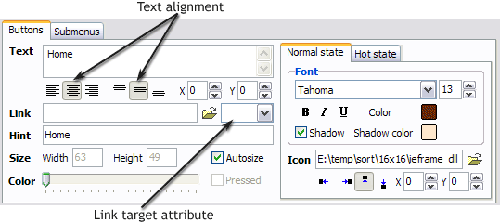
Properties of play button This toolbox is for adjusting the buttons' properties. You can adjust one single button or a group of web page buttons selected with Ctrl/Shift keys at once.
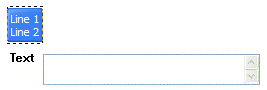
Text - type the button text here. If you want the button to have several lines of text just press "Enter" after typing each line.
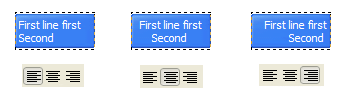
Text alignment - defines text alignment inside the button.
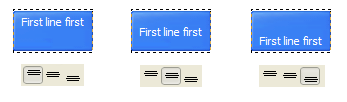
Text offset - text offset in relative coordinates. For more precise text position adjustment.
Link - the link that is to be opened when user clicks the button. For example: http://www.vista-buttons.com. You can also click "Open" icon to the left of the "Link" field to select the page you want to link to.
Link target attribute - link behavior adjustment. Link target attribute tells web-browser where to open the linked page. This attribute represents the Target attribute of the link (<a> tag in HTML). You can either enter your target value in the field or choose from the predefined attribute values in the list.
If you enter your own value, it must be a window or a frame name. Note, that names are case-sensitive. The linked document will then be opened in that window/frame.
Predefined attribute values:
_blank - Browser creates a new window for the linked page.
_parent - Linked page replaces the current frame's framesetting page (if one exists; otherwise, it acts like _self).
_self - Linked page replaces the current page in its window or frame.
_top - Linked page is to occupy the entire browser window, replacing any and all framesets that may be loaded (acts like _self if there are no framesets defined in the window)
If you leave the field clean then the linked page will be opened in the same browser window.
Hint - specifies the tooltip that is shown when you hold the mouse over the button for a few seconds.
Autosize - defines whether the button size is set automatically to accommodate all its contents or not. If not, you should enter the button size manually in the "Width" and "Height" fields.
Width, Height - if "Autosize" property is off then you can enter the button size in these fields.
Pressed - this property is disabled unless your menu type is "3-state toggle". If the menu type is "3-state toggle" and the property is set then the button will be displayed as pressed. Note, that only one button in the menu can be "pressed" at a time.
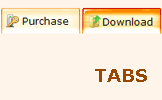
In the example below, the "Download" web page buttons Pressed property is set.
Color - move slider to change selected buttons' colors.
DESCRIPTION
Create both horizontal and vertical menus and submenus with any amount of menus on one page.
Design menus absolutely based on CSS (Cascading Style Sheets). It is possible to apply the personal CSS styles for every elements of the menu.
When the submenu is bigger than the visible page area, the size of submenu will be automatically decreased. To view all the submenu you should use scrollbars
Total control of all menu parameters
Each parameter of a html buttons may be easily changed, allowing you to achieve the required result.
You can set such parameters as direction, size, color, font face, font style, shadow, icons, alignment, links, targets, tooltips, word wrap, and other parameters.
Any change can be undone by pressing "Undo" button.
Drop Down Menu Windows
Instant preview
Each change of button-menu appearance is instantly displayed in the Preview Window.
At the same time, you will be able to test how the buttons would respond to the mouse events.
Collapsible Navigation Menus With Css
Base De Données Images Style Xp Javascript Dropdown Menu
Not just buttons
Drop Down JavaScript Menu is able to create not just separate images of buttons, but also complete web menus. These menus can be either horizontal or vertical, they support �rollover� and �click� effects with full set of javascript and html code.
JavaScriptDrop Down Boxes So, you have been thinking about adding a drop box for people to navigate your page with. One problem ..how is it done? Below is a sample navigation drop box.
Dynamic Drive DHTML Scripts- AnyLink Drop DownMenu With all of your anchor links and drop downmenus defined using the <script type="text/javascript"> //anylinkcssmenu.init("menu_anchors_class") //Pass in the CSS class
JavaScriptMenu Tigra Menu is free JavaScriptmenu navigation component for web sites. Benefits use cross platform visual builder to create the professionally looking drop down
JavaScript Codes: Drop downmenu list The JavaScript Source is your resource for thousands of free JavaScripts for cutting and pasting into your Web pages. Get free Java Script tutorials, references, code
Dynamic Drive DHTML Scripts- AnyLink Drop DownMenu With all of your anchor links and drop downmenus defined using the <script type="text/javascript"> //anylinkcssmenu.init("menu_anchors_class") //Pass in the CSS class
JavaScriptDropdownMenuJavascriptdropdownmenu, sometimes referred to as a Jump Menu because it jumps to the requested URL as soon you make your selection.
JavaScript DHTML Tutorials Has a new section Javascript FAQ. Now there only two questions and two answers. Internet has a lot of scripts with the name "Drop DownMenu". One day I needed to make
JavaScript DHTML Tutorials Has a new section Javascript FAQ. Now there only two questions and two answers. Internet has a lot of scripts with the name "Drop DownMenu". One day I needed to make
Drop-downMenu Builders Drop-downMenu Builders (Page 1 of 5 ) Dan Wellman evaluates free and commercial software that can help you create menus that expand into sub-menus and are used as a
Ultimate Drop DownMenu: Accessible JavascriptMenu by UDM is a fully-featured and accessible website menu, which provides useable content to all browsers - including screenreaders, search-engines and text-only browsers.
Dynamic Drive DHTML Scripts- AnyLink Drop DownMenu With all of your anchor links and drop downmenus defined using the <script type="text/javascript"> //anylinkcssmenu.init("menu_anchors_class") //Pass in the CSS class
Dynamic Drive DHTML Scripts- AnyLink Drop DownMenu With all of your anchor links and drop downmenus defined using the <script type="text/javascript"> //anylinkcssmenu.init("menu_anchors_class") //Pass in the CSS class
Ultimate Drop DownMenu: Accessible JavascriptMenu by UDM is a fully-featured and accessible website menu, which provides useable content to all browsers - including screenreaders, search-engines and text-only browsers.
JavaScript Codes: Drop downmenu list The JavaScript Source is your resource for thousands of free JavaScripts for cutting and pasting into your Web pages. Get free Java Script tutorials, references, code
JavascriptMenu. JavascriptMenu Builder Javascript Dynamic Double Drop DownMenu; Javascript Change DropdownMenu Common Style 9 - Html Menu Buttons; Collapsible MenusJavascript Tutorial Mouseover Menu Green Glossy
JavaScript DHTML Tutorials Has a new section Javascript FAQ. Now there only two questions and two answers. Internet has a lot of scripts with the name "Drop DownMenu". One day I needed to make










 Text - type the button text here. If you want the button to have several lines of text just press "Enter" after typing each line.