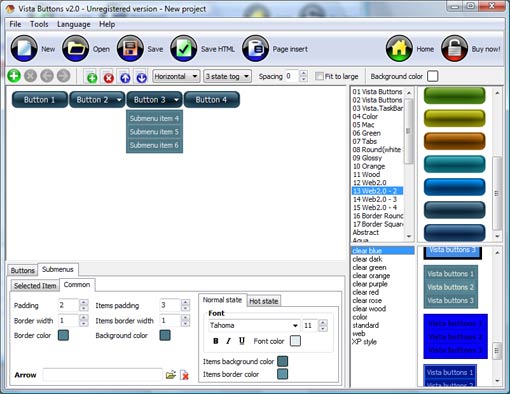
Click "Add button" and "Add submenu's item's buttons to create your menu.
You can use ready to use Templates. To do it just select theme you like in the "Button themes" and "Submenu themes" list. Then you can browse this theme's button backgrounds. When you find a button background or submenu theme you like, double-click it to apply.
Select vista button or submenu by clicking it and change button appearance for normal and mouse over states and set buttons/submenus link properties and link target attributes.
Save your menu as project file, as HTML page or insert your menu into the existing HTML page
MENU HORIZONTAL JAVASCRIPT
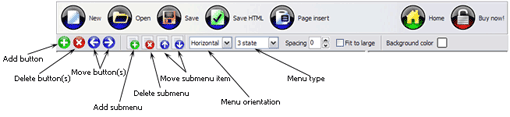
Button builder toolbar
New - to create new project.
Open - to open existing project.
Save - to save current project into the project file (*.xwb).
Save as� - to save current project into the project file (*.xwb) or into the HTML file or to save your project under another name. Choose type from the "File type" list in the "Save as�" dialog.
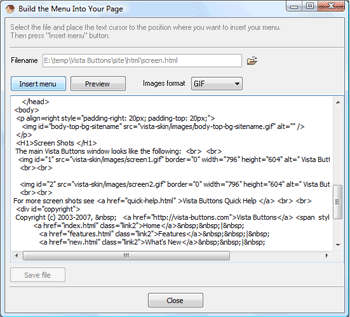
Page insert - to insert your menu into the existing web-page. "Build the menu into your page" dialog will appear. Click "Browse" button to choose a page you want to insert your menu into. After choosing a page and clicking Ok, the chosen page's HTML code will be opened in the Code field of the dialog.
After that, you can edit your code to prepare the page for the menu insertion. Normally, no coding is required. Then set the cursor to the line you want menu code to be inserted to and click the "Insert" button. The menu code will be inserted into the page. Then you can either save the page or close the dialog without saving by clicking "Save" or "Close" buttons.
Add button - to add website buttons to the menu.
Delete button(s) - to delete selected button(s). Is inactive if no button is selected. Move button(s) - to change selected button's order in the menu. Selected button(s) will be moved one position left/right each time you click one of the Move buttons.
Add submenu's item - to add submenu's item to the menu. Is inactive if no button is selected.
Delete button(s) - to delete selected submenu item(s). Is inactive if no button is selected.
Move submenu's item - to change selected submenu's item order in the menu. Selected item(s) will be moved one position up/down each time you click one of the submenu's item.
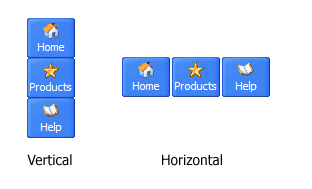
Menu orientation - to select menu orientation (vertical or horizontal). In vertical menu all website buttons are arranged in a column and have the same width. If the menu is horizontal then all its buttons are arranged in a row and have the same height.
Menu type - to select menu type (1-state, 2-state, 3-state and 3-state toggle).
1-state buttons are simple static image buttons. Example:
2-state buttons respond to mouseOver event creating rollover effect. Mouse click doesn't change the button appearance. Example:
3-state buttons support both mouseOver and mouseClick event. Example:
3-state toggle buttons additionally stick in the pressed state after a click. Example:
Spacing - to add space between all buttons.
Fit to large - to make all the menu buttons have the same size. The size will be automatically set to accommodate the biggest text and/or icon in the menu.
Background color - click the square to select Work area's background color.
DESCRIPTION
Setup menu parameters manually or using JavaScript Drop Menu GUI interface. Then save your code in html page and your menu is ready!
Use one of the predefined buttons' and submenus templates
cretae your own themes in JavaScript Drop Menu application
Stop paying month-to-month subscription to web image and icon collections!
Don't waste your money on licenses for every new domain where you want to place the menu! Pay once, use for life, anywhere!
Efectos Pagina Java Dhtml
Adjusting menu appearance
Create drop down menus based on css
Make various styles for each submenu item adjusting css styles
Create 1-state, 2-state, 3-state and 3-state toggle buttons
Save buttons' images in GIF, JPEG, PNG files
Cross Browser Fading Menu Ajax
Ajax Extensible Descargar Menu Horizontal Javascript
Easy to Use
GUI interface to create your menu horizontal javascript menus easily and in no time
Sensible menu parameters for manual editing
RELATED
DHTML Javascript Tree Menu. Deluxe Tree. v3.3 Deluxe Tree is cross-frame and cross-browser DHTML Javascript tree menu with a lot of powerful features, flexible parameters and easy installation.
DHTML Javascript Tree Menu. Deluxe Tree. v3.3 Deluxe Tree is cross-frame and cross-browser DHTML Javascript tree menu with a lot of powerful features, flexible parameters and easy installation.
HorizontalJavaScriptMenu Main page. HorizontalJavaScriptMenu Description. This menu example demonstrates an implemention of a horizontalJavaScriptmenu based on Tigra menu component.
DHTML Javascript Tree Menu. Deluxe Tree. v3.3 Deluxe Tree is cross-frame and cross-browser DHTML Javascript tree menu with a lot of powerful features, flexible parameters and easy installation.
horizontalmenu - JavaScript / DHTML / AJAX hello everyone iam new in this forum, i want to create horizontalmenu contains p1,p2,p3 if iam click or move mouse to p1 new window open in right hand side show the
DHTML Javascript Tree Menu. Deluxe Tree. v3.3 Deluxe Tree is cross-frame and cross-browser DHTML Javascript tree menu with a lot of powerful features, flexible parameters and easy installation.
Light Weight Multi Level Menu | CSS Creator Multi level menu with color generator and minimum JavaScript you leave the field (click elsewhere), the style will be applied to the Horizontalmenu
HorizontalMenu Flash Dropdown Flash Menu Download Flash HorizontalMenu doesn't use any image for menu items. Flash HorizontalMenu Flash Popup Menu Wizard - Flash Text Fader Wizard - Javascript Accordion Menu
Light Weight Multi Level Menu | CSS Creator Multi level menu with color generator and minimum JavaScript you leave the field (click elsewhere), the style will be applied to the Horizontalmenu
horizontaljavascriptmenu generator Create a horizontaljavascriptmenu for your web site with this free generator. Make javascript web menu without programming knowledge
HorizontalMenu Flash Dropdown Flash Menu Download Flash HorizontalMenu doesn't use any image for menu items. Flash HorizontalMenu Flash Popup Menu Wizard - Flash Text Fader Wizard - Javascript Accordion Menu
JavascriptMenu. JavascriptMenu Builder JavascriptHorizontal Drop Down Menu Bar Green Orange Roll Over Buttons; Creating Menu Java Jsp Flyout MenuHorizontal Blue Toolbar; Creating A Dropdown Menu With Javascript
Light Weight Multi Level Menu | CSS Creator Multi level menu with color generator and minimum JavaScript you leave the field (click elsewhere), the style will be applied to the Horizontalmenu
JavaScriptMenus | Navigation Scripts & Programs A horizontal drop down menu script which uses Javascript and CSS. When the mouse pointer is moved over a link a further set of links is revealed.
Light Weight Multi Level Menu | CSS Creator Multi level menu with color generator and minimum JavaScript you leave the field (click elsewhere), the style will be applied to the Horizontalmenu
HorizontalJavaScriptMenu The above example was created with CodeCharge Studio and is available in the following programming languages: ASP/VBScript, ASP.NET (C# and VB), PHP, Java Servlets, JSP
horizontaljavascriptmenu generator Create a horizontaljavascriptmenu for your web site with this free generator. Make javascript web menu without programming knowledge
Horizontal Drop Down Menu | JavaScriptMenusHorizontal Drop Down Menu. JavaScriptMenus from Hot Scripts. A horizontal drop down menu script which uses Javascript and CSS. When the mouse pointer is moved over a
Horizontal Drop Down Menu | JavaScriptMenusHorizontal Drop Down Menu. JavaScriptMenus from Hot Scripts. A horizontal drop down menu script which uses Javascript and CSS. When the mouse pointer is moved over a
Horizontalmenu with Horizontal submenu With some JavaScript you can make the menus "stay." http://www.alistapart.com/articles/hybrid it a couple of times and tested the code out and the top horizontalmenu
MenusJavascript & DHTML Win32 application to build and maintain menus without knowledge of javascript. Version 5.1 Menu can be horizontal justified, bugfix for NS6 positioning