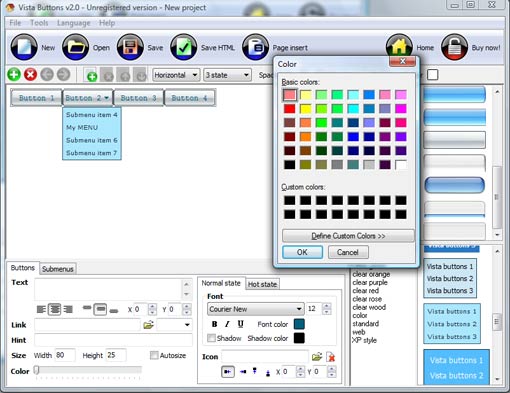
Click "Add button" and "Add submenu's item's buttons situated on the Vista Buttons Toolbar to create your menu. You can also use "Delete selected item", "Delete submenu's item" and move buttons.
Create your own buttons or use ready to use Templates.
Select vista button or submenu by clicking it and change button appearance for normal and mouse over states and set buttons/submenus link properties and link target attributes.
Save your menu.
JAVASCRIPT DROPMENUE TUTORIAL
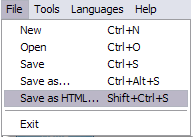
1) File menu
New - to create new project.
Open - to open saved project. You will be asked if you would like to save the current project in the menu buttons creator.
Save - to save current project in the project file (*.xwb). When you save to project file, the directory "ProjectName.xwb.icons" is created, where ProjectName is the name of your project file. This directory contains button icons, .css and .js files of the saved menu.
Save as� - to save current project in the project file (*.xwb) or in the HTML file or to save your project under another name. Choose type from the "File type" list in the "Save as�" dialog and enter project's (new) name. When you save to project file, the directory "ProjectName.xwb.icons" is created, where ProjectName is the name of your project file. This directory contains button icons, .css and .js files of the saved menu. If the menu doesn't have any icons then the directory is not created.
Save as HTML - to save current project into the HTML file (*.html). Project HTML file will be saved then, and the directory created, containing buttons' images. The directory name will be: "YourProjectName-files", where YourProjectName is the name of the HTML file saved. For example: if you enter "Header" in the "Name" field of the "Save as�" dialog, then "Header.html" and directory named "Header-files" will be created.
Exit - to close Vista buttons application.
2) Tools
Export images - to save menu buttons' images as gif-files (*.gif), png-files (*.png) or jpg-files (*.jpg). "Save As�" dialog will appear, where you can either type each button name or leave it unchanged. If you want to save the button images, press "Save". "Save settings" dialog will appear where you can choose image format. Either way (if you don't want the button images to be saved), press "Cancel". This procedure will be repeated for all the menu buttons. When you press "Save", 1 to 3 images are to be saved, depending on the menu type. Their names will be: ButtonName_0.gif - ButtonName_2.gif, where ButtonName is the name you have entered when saving.
ButtonName_0 - corresponds to Normal state.
ButtonName_1 - Hot state image.
ButtonName_2 - corresponds to pressed/clicked state.
Theme editor - to edit/create new themes.
Page insert - you can insert your menu into the existing HTML page.
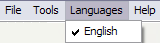
3) Languages menu
The "Languages" menu contains the list of available interface languages. English is the default language setting.
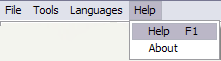
4) Help menu
Help - to read the help.
About -show information about Vista Buttons.
DESCRIPTION
Good navigation system is an important part of web site success. If people can't find their way around the site, they will rapidly give up looking and go, never to return. So, it's very significant that your website has a neat, fast, and gratifying to the eye navigation. Don't permit your web site visitors to get lost. Try JavaScript Drop Down Menu!
Easy, quick, professional
Its very easy to create professional high-quality web buttons with the help of Drop Down JavaScript Menu. Once installed you�ll be making buttons for your web site with no programming or drawing required.
Dynamisches Menü Crossbrowser Css
3-state rollover buttons
Drop Down JavaScript Menu automatically generates images of buttons for normal, mouseover, and click states.
There is also a feature of creation either static or 2-state buttons.
Addons for Webspell - Files � 4.2.0 Addons (Old) Tutorial V4.2.1 Last post: Sn1p3r Board: DE - Technischer to fold in/out squad members via asynchronous javascript Diese verf�gt nun �ber ein Dropmen� Sprache: Englisch
Datens�tze Aktualesieren - php.de durch den Dropmen� m�chte ich gerne f�r jeden Datensatz die m�glichkeit haben den #php/QuakeNet Tutorial - MySQL / Datens�tze bearbeiten Du kannst im Formular entweder
[Erledigt] drop down men� werte weitergeben - php.de variable weitergeben, dropdown wert in variable, dropdown men� mit post in html, wert aus dropdown men� nehmen, dropdown auswahl weitergeben, variablen aus dropmen�
Addons for Webspell - Files � 4.2.0 Addons (Old) Tutorial V4.2.1 Last post: Sn1p3r Board: DE - Technischer to fold in/out squad members via asynchronous javascript Diese verf�gt nun �ber ein Dropmen� Sprache: Englisch
2 abh�ngige Dropdownmen�s [Archiv] - SELFPHP Forum <td><a href="javascript:deleteUser({id})"><img src jetzt richtig sehe ist direkt nach dem ersten dropmen� dicken b�cher w�lzen - es gibt sehr gute tutorials im
2 abh�ngige Dropdownmen�s [Archiv] - SELFPHP Forum <td><a href="javascript:deleteUser({id})"><img src jetzt richtig sehe ist direkt nach dem ersten dropmen� dicken b�cher w�lzen - es gibt sehr gute tutorials im
Ein dropmen� - HTML- & CSS-Anleitungen @ eByteNet.com Foren�bersicht; Suche; Regeln; Tutorial / How-To; eByteWiki Verwarnungen: 0. eBytes: 1036.14. Titel: Re: Ein dropmen� diese Redundanz vermeiden wir den Einsatz von Javascript
Addons for Webspell - Files � 4.2.0 Addons (Old) Tutorial V4.2.1 Last post: Sn1p3r Board: DE - Technischer to fold in/out squad members via asynchronous javascript Diese verf�gt nun �ber ein Dropmen� Sprache: Englisch
Datens�tze Aktualesieren - php.de durch den Dropmen� m�chte ich gerne f�r jeden Datensatz die m�glichkeit haben den #php/QuakeNet Tutorial - MySQL / Datens�tze bearbeiten Du kannst im Formular entweder
[Erledigt] drop down men� werte weitergeben - php.de variable weitergeben, dropdown wert in variable, dropdown men� mit post in html, wert aus dropdown men� nehmen, dropdown auswahl weitergeben, variablen aus dropmen�
Addons for Webspell - Files � 4.2.0 Addons (Old) Tutorial V4.2.1 Last post: Sn1p3r Board: DE - Technischer to fold in/out squad members via asynchronous javascript Diese verf�gt nun �ber ein Dropmen� Sprache: Englisch
Ein dropmen� - HTML- & CSS-Anleitungen @ eByteNet.com Foren�bersicht; Suche; Regeln; Tutorial / How-To; eByteWiki Verwarnungen: 0. eBytes: 1036.14. Titel: Re: Ein dropmen� diese Redundanz vermeiden wir den Einsatz von Javascript
2 abh�ngige Dropdownmen�s [Archiv] - SELFPHP Forum <td><a href="javascript:deleteUser({id})"><img src jetzt richtig sehe ist direkt nach dem ersten dropmen� dicken b�cher w�lzen - es gibt sehr gute tutorials im
Ein dropmen� - HTML- & CSS-Anleitungen @ eByteNet.com Foren�bersicht; Suche; Regeln; Tutorial / How-To; eByteWiki Verwarnungen: 0. eBytes: 1036.14. Titel: Re: Ein dropmen� diese Redundanz vermeiden wir den Einsatz von Javascript
2 abh�ngige Dropdownmen�s [Archiv] - SELFPHP Forum <td><a href="javascript:deleteUser({id})"><img src jetzt richtig sehe ist direkt nach dem ersten dropmen� dicken b�cher w�lzen - es gibt sehr gute tutorials im
Ein dropmen� - HTML- & CSS-Anleitungen @ eByteNet.com Foren�bersicht; Suche; Regeln; Tutorial / How-To; eByteWiki Verwarnungen: 0. eBytes: 1036.14. Titel: Re: Ein dropmen� diese Redundanz vermeiden wir den Einsatz von Javascript
Ein dropmen� - HTML- & CSS-Anleitungen @ eByteNet.com Foren�bersicht; Suche; Regeln; Tutorial / How-To; eByteWiki Verwarnungen: 0. eBytes: 1036.14. Titel: Re: Ein dropmen� diese Redundanz vermeiden wir den Einsatz von Javascript
2 abh�ngige Dropdownmen�s [Archiv] - SELFPHP Forum <td><a href="javascript:deleteUser({id})"><img src jetzt richtig sehe ist direkt nach dem ersten dropmen� dicken b�cher w�lzen - es gibt sehr gute tutorials im