Click "Add button" and "Add submenu's item's buttons to create your menu.
You can use ready to use Templates. To do it just select theme you like in the "Button themes" and "Submenu themes" list. Then you can browse this theme's button backgrounds. When you find a button background or submenu theme you like, double-click it to apply.
Select vista button or submenu by clicking it and change button appearance for normal and mouse over states and set buttons/submenus link properties and link target attributes.
Save your menu as project file, as HTML page or insert your menu into the existing HTML page
JAVA DROP DOWN MENU
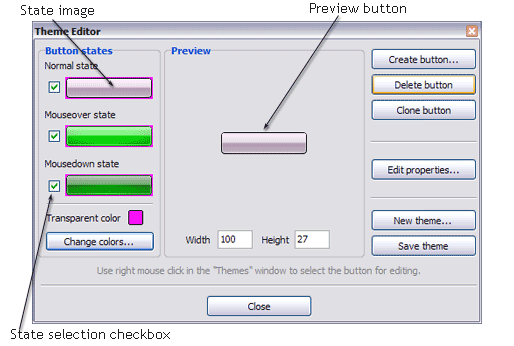
Create buttons in theme editor To open Theme editor right-click "Tools/Theme editor" in the Main menu. Theme editor helps you create your own themes or modify existing ones. To select a button you would like to edit, just lick it in the Themes toolbox.
Create button... - to add new button to the current theme. After you click the "Create button" button, the "Create New Button" dialog will appear.
Load image - to open button states image file (*.bmp)
Total images - to define how many button state images are in the opened file. The button states image will then be divided into this number of state images.
State � offset fields - to set the state image for each Normal/Hot state of the button. If you set state offset to 0 then the topmost state image will be used for the state. If you set state offset to 1 then the second state image will be used etc. State 1 corresponds to the Normal state, state 2 - to the Hot state, state 3 - to the Pressed state.
Create button - to add the button to the current theme.
Delete button - to delete the button from the current theme.
Clone button - to create a copy of the button in the current theme.
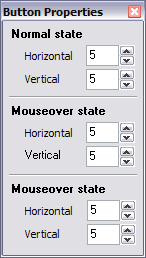
Edit properties... - to edit the button state images' edge width. After you click the "Edit properties..." button, the "Button properties" toolbox will appear.
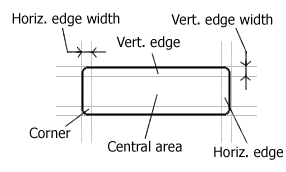
Horizontal and Vertical - to define edge width for each state. Edges are not scaled when you change the button size. Using edges is useful when you would like the button to have border. Then, if the border is within the edges, it won't be scaled.
Central area is scaled in both directions. Corners are not scaled. Vertical edges are not scaled in vertical direction. That is, when you change the button height, vertical edges will not be scaled. And vice versa, horizontal edges are not scaled in horizontal direction.
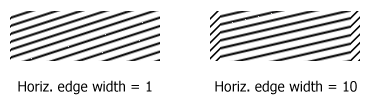
Example: Let's say, we have the following button (size: 50x50):
Let's change it's width to 150:
As you can see, in the left image (Horiz. edge width = 1) whole button image was scaled to fit its new size. In the second case (Horiz. edge width = 10) left and right edges of the button were not scaled. Same with the vertical edge width.
Transparent Color - to set the transparent color. When you add new button, transparent color is automatically set to match the color of the top-left corner of the button states image.
New theme... - to create a new theme. "Create New Theme" dialog will appear, where you should enter theme name and special notices (for example your copyright info, email, etc.).
Save theme - to save theme changes.
Close - to close Theme editor.
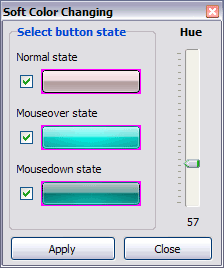
Change colors... - to exchange web button images colors. After clicking the "Color exchange" button, the "Color exchange" dialog will appear. Select the state(s) you want to be affected by clicking the checkbox next to the state image.
Move slider to find the color you like.
Wight and Height fields - to set the preview button size.
DESCRIPTION
Good menu is an essential part of website commercial success. If people can't find their way around the site, they will fast give up seeking and retire, never to return. So, it's extreme serious that your website has a accurate, precise, prompt, and navigation of immaculate appearance. Don't let your web site guests to get lost. Try JavaScript Drop Menu!
Stop paying month-to-month subscription to web image and icon collections!
Don't waste your money on licenses for every new domain where you want to place the menu! Pay once, use for life, anywhere!
Css Dynamic Menu Flyout
Easy, quick, professional
Its very easy to create professional high-quality web buttons with the help of Java Script Drop Down Menu. Once installed you�ll be making buttons for your web site with no programming or drawing required.
Codes Sources Des Menus Html En Javascript
Drop Down Im Html Modus Java Drop Down Menu
High Quality and Professional Results
You don�t have to know HTML, JavaScript, CSS or any other coding languages to make multi-state rollover web buttons, professional cross-browser, search engine friendly DHTML menus.
Vista Web Buttons will generate all necessary images, html, javascripts, css styles automatically!
RELATED
Menu Design Guide: Drop-downmenusDrop-downmenu design guide This is again a reason for opting for a javadrop-downmenu. While java also has its
jQuery DropDownMenu, Web Buttons, Animated jQuery Menu A collection of highly configurable java applets that allows you to create cross-browser dropdownmenus, bars, and buttons. DBFView is a compact but powerful tool for
JavaDropDownMenu. Web Menu Templates JavaDropDownMenu. Make fast and straightforward navigation for your web site with Javascript Menu Builder! How To Create Menus In Photoshop
A Simple JavaScript Drop-downMenu Shows you how to use JavaScript and a SELECT list to create a simple drop-down navigation menu for your website.
JDDM (DropDownMenu) | JavaMenu Systems JDDM (DropDownMenu). JavaMenu Systems from Hot Scripts. JDDM is a professional javadrop-down and popup Web Menu applet, a comprehensive solution for website navigation
jQuery DropDownMenu, Web Buttons, Animated jQuery Menu A collection of highly configurable java applets that allows you to create cross-browser dropdownmenus, bars, and buttons. DBFView is a compact but powerful tool for
Java Swing DropDownMenu Encoding It is only with the java swing dropdownmenu because there are words that doesn't show the correct letters / characters I am encoding..
9: Menus and Toolbars In Java look and feel applications, you can provide three kinds of menus: drop-downmenus, submenus, and contextual menus. A drop-downmenu is a menu whose titles appear
dropdownmenu question - Java hi, i have a JFrame one menuBar placed on a JPanel.. and then two JPanel with different things (let me call them ActionPanelOne, and ActionPanelTwo). i put
The javamenu specialists Javamenu applets for website navigation. Free applets and free javamenus. IMINT.COM are java navigation specialists for dropdownmenus and tree navigation applets.
JavaDropDownMenu. Web Menu Templates JavaDropDownMenu. Make fast and straightforward navigation for your web site with Javascript Menu Builder! How To Create Menus In Photoshop
JDDM (DropDownMenu) | JavaMenu Systems JDDM (DropDownMenu). JavaMenu Systems from Hot Scripts. JDDM is a professional javadrop-down and popup Web Menu applet, a comprehensive solution for website navigation
jQuery DropDownMenu, Web Buttons, Animated jQuery Menu A collection of highly configurable java applets that allows you to create cross-browser dropdownmenus, bars, and buttons. DBFView is a compact but powerful tool for
A Simple JavaScript Drop-downMenu Shows you how to use JavaScript and a SELECT list to create a simple drop-down navigation menu for your website.
JavaDropDownMenu. Web Menu Templates JavaDropDownMenu. Make fast and straightforward navigation for your web site with Javascript Menu Builder! How To Create Menus In Photoshop
Javadropdownmenus Thousands of members have registered to discuss and assist one another in the Site-Reference forums dedicated to SEO, online marketing and good site building practices.