QUICK HELP
Create your menu using "Add button" and "Add submenu's item's buttons. Use various ready to use Templates. Double click on the Template to apply it. Change button appearance for normal and mouse over states and set buttons/submenus link properties and link target attributes. Save your menu as project file, as HTML page or insert your menu into the existing HTML page
HTML SUB MENU
Let's assign text to the web menu buttons. Select first web button by clicking it and then enter text in the "Text" field on the Properties toolbox. You will see that, as you enter the text, the selected button's text will change too. 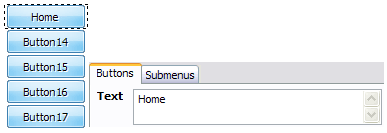
Then select next web button with click. Enter its text and so on. After finishing, the menu will look like this: 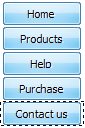
Now let's add some icons. Select button and then click the "Open icon" button on the "Normal state" tab of the Properties toolbox. 
"Open" dialog will appear, where you can choose an icon. Other way to assign an icon is to type its full path and name in the "Icon" field ("c:\myicons\stylish_3\pretty.ico", for example). Repeat this for each menu button. You should get something like this in result: 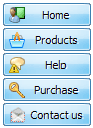
Let's change icons' position inside the buttons. To do it you should select all buttons by clicking on the first button, then pressing the Shift key, and then clicking the last web button while still holding the Shift key. You can also press "Ctrl + A" to select all buttons. Then click one of the "Icon Align" buttons on the "Normal State" tab on the Properties toolbox.

You will see that icons are aligned in the selected way now. In this example we choose Top icon align. 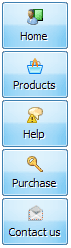
Now let's add text shadow to buttons when button in hot state. Select all buttons as described in the previous step and then set the "Shadow" checkbox on the "Hot state" tab of the Properties toolbox.
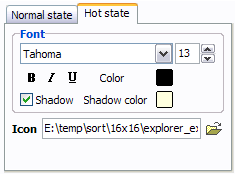
Now, when you point mouse at the menu button, shadow will appear under the button text like in the "Products" button of the following example: 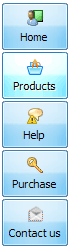
Let's change the menu theme. To do it just select theme you like in the themes list on the buttons editor toolbox. Then you can browse this theme's button backgrounds. Note, that button backgrounds are previewable. You can look at their behavior while choosing. Just point mouse at it, click it to know how web button will react.
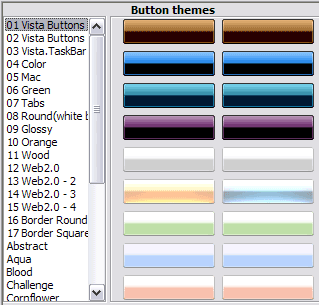
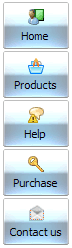
When you find a button background you like, double-click it to apply. For example, after choosing one of the "01 Vista Buttons" theme's backgrounds, we'll get following results:
DESCRIPTION
Sub menus dropdown over all the objects on the page (select, flash, object, embed). Design personal styles for any submenu and item. Use images for icons, backgrounds of items. Using images you can create menus entirely based on graphics.
| Easy, quick, professional |
| Its very easy to create professional high-quality web buttons with the help of JavaScript DropDown Menu. Once installed you�ll be making buttons for your web site with no programming or drawing required. |
Durchsichtiges Menu Html | Vista-style menus |
| Web menus, which are created by Java Script Drop Down Menu, exactly correspond with Windows Vista graphic interface components. That is why the visitors of your site will not have to spend their time in order to familiarize with the unusually-looking navigation. Nevertheless, you are not limited by the standard Windows themes, and you will be able to create your own original buttons. |
Drag Drop Ajax Layer| Ajax Scroll Drag Pages Html Sub Menu |
| Extended capabilities to save and export the results |
- Everything you create with the program, has been saved in the Project File. This allows you either to continue your work at any time, or share your ideas with friends and colleagues.
- You can also save your menu as a HTML page, or export it as separate graphic images.
|
RELATED
Dan's Super Subs Menu You will find our best section of subs below. Simply take down the sub Sandwich number to the left and click the blue fax order button to fill out your order.
HTML Basix - DHTMLMenu tutorial Subscribe to the HTML Basix RSS feed. The easiest way to create Sub Menu Items for the rest of the buttons is to right click
Cosmic Menu -The Original Dave's Cosmic Sub tm (Our Signature Sub) Pepperoni, Genoa Salami, Prosciutto, Lettuce, Tomatoes, Sliced Banana Peppers, Onions, Fresh Garlic, Herbs
Sublime Subs :: Menu Hayward's Top 5 Favorites. Sublime Italian. Classic Turkey. Club Sub. The Funky Chicken. Mozzacado
Sub Station II Menus- Orangeburg, St. Matthews, Swansea Home of the best Subs in Orangeburg, St. Matthews and Swansea, come to Sub Station II
verticle horizontal menu generator, online javascript tool Make verticle and horizontal menus for your website with this online javascript web tool.
Dynamic Drive- DHTML & JavaScript Menu And Navigation scripts As the mouse moves over the link in question, a menu pops up containing "sub links". Think of it as a "loose" drop down menu. Dropdown HTML control FF1+ IE5
Pizza, Sub & Salad Menu for Wally's Pizza & Subs Franchises Wallys menu offers pizza by the slice or by the pan, subs and salads.
Making Your Own Layered Sub-Menus The HTML markup for the sub-menus should be placed immediately below the BODY tag. This is not necessarily the place where they will appear, since the sub-menus have
flash menu generator html flash buttons creator builder * Customizable font face, font size and font style for main buttons item and sub Web site, floating, sliding, html menu javascript, making software, rollover, online
Dan's Super Subs Menu You will find our best section of subs below. Simply take down the sub Sandwich number to the left and click the blue fax order button to fill out your order.
verticle horizontal menu generator, online javascript tool Make verticle and horizontal menus for your website with this online javascript web tool.
How Make Sub Menu Html. Web Menu How To How Make Sub Menu Html. Make your web site navigation clean and comfortable with Javascript Menu Builder! How To Save Indhtml
USA SUBS "We've got it all!" USA Subs - We've got it all! Fresh Baked Bread, Hot Grilled Subs, Cold Subs, Wraps & Pockets, Toasted Subs, Salads Made to Order, Party Subs, Frozen Lemonade!
USA SUBS "We've got it all!" USA Subs - We've got it all! Fresh Baked Bread, Hot Grilled Subs, Cold Subs, Wraps & Pockets, Toasted Subs, Salads Made to Order, Party Subs, Frozen Lemonade!
Sub-Menu Code - HTML Help Central Site Building Central > HTML Sub-Menu Code HTML Join HTML Help Central. To sign up for your FREE account INSTANTLY fill out the form below!
Pop Menu Magic: Creating a Sub-Menu adding a new sub-menu level to your new sub-menu.-When you're done, click the OK button to apply the menu changes to your page. The system will revise the html menu markup
Popup HTML Content as sub menu Milonic provide full featured pull down web menus for some of the worlds largest companies click here to see what it can do for you
Blimpie - Deli Subs & Super Stacked Subs Blimpie's Menu consists of a wide variety of tasy sub sandwiches. Check out our Deli Subs and Super Stacked Subs Americas Way!
Gozzettis' Zettiboli and Sub Menu pizza, the best pizza in The Woodlands, TX, ITALIAN Gozzetti's Pizzeria The Woodlands, TX Dine-In - Carry Out - Delivery. Grogans Mill - 832.585.0600
How Make Sub Menu Html. Web Menu How To How Make Sub Menu Html. Make your web site navigation clean and comfortable with Javascript Menu Builder! How To Save Indhtml
Pastel color menu with dynamic submenu using CSS HTML code is very simple: you can use the flexibility of elements ul, li to design of questions regarding this code. 1.) how would you go about displaying the sub menu if
Em's Original Sub Shop Menu These subs include: Crisp Lettuce, Red Ripe Tomatoes, Chopped Onions, Em's Famous Dressing, White American Cheese, Pickles, Crushed Pepper
Blimpie - Deli Subs & Super Stacked Subs Blimpie's Menu consists of a wide variety of tasy sub sandwiches. Check out our Deli Subs and Super Stacked Subs Americas Way!
Pastel color menu with dynamic submenu using CSS HTML code is very simple: you can use the flexibility of elements ul, li to design of questions regarding this code. 1.) how would you go about displaying the sub menu if
Bite Me Subs - Superior Sub Sandwiches, Catering, Salads and Download our menus for your office, dorm, or home! You will need Acrobat Reader and you Bite That for free by clicking here.
Second City Subs Ordering Call (773) 549-8710 2146 N. Halsted St., Chicago, IL 60614. In Lincoln Park 2 Blocks from the Intersection of Halsted and Lincoln
USA SUBS "We've got it all!" USA Subs - We've got it all! Fresh Baked Bread, Hot Grilled Subs, Cold Subs, Wraps & Pockets, Toasted Subs, Salads Made to Order, Party Subs, Frozen Lemonade!
USA SUBS "We've got it all!" USA Subs - We've got it all! Fresh Baked Bread, Hot Grilled Subs, Cold Subs, Wraps & Pockets, Toasted Subs, Salads Made to Order, Party Subs, Frozen Lemonade!
Bite Me Subs - Superior Sub Sandwiches, Catering, Salads and Download our menus for your office, dorm, or home! You will need Acrobat Reader and you Bite That for free by clicking here.
Pizza Bella - Subs Menu Above served with cheese and choice of lettuce, tomato, onion, peppers, pickles, hot peppers, mayo or oil on Italian roll or Syrian
Pizza & Subs Menu Nachos : 3.89: Extra Nacho Cheese.93: Jalapenos.79: Garlic Bread: 1.85: Gralic Bread & Mozzarella Cheese: 3.70: Calzone Sauce - Small.51: Calzone Sauce - Large
How Make Sub Menu Html. Web Menu How To How Make Sub Menu Html. Make your web site navigation clean and comfortable with Javascript Menu Builder! How To Save Indhtml
Menu Html Sub Folders Not Work I am having problems with my html files that are located in sub folders of my site the menu html does not work on them.
Dynamic Drive CSS Library- SuckerTree Vertical Menu (v1.1) It supports as many sub levels as you desire, plus multiple Suckertree menus on the same page. The CSS and JavaScript automatically adopts to your HTML code in each case.
How Make Sub Menu Html. Web Menu How To How Make Sub Menu Html. Make your web site navigation clean and comfortable with Javascript Menu Builder! How To Save Indhtml
sub-menus - HTML / CSS answers sub-menus. Ask HTML / CSS questions and get answers from our community of HTML / CSS experts and professionals on BYTES.
Pastel color menu with dynamic submenu using CSS HTML code is very simple: you can use the flexibility of elements ul, li to design of questions regarding this code. 1.) how would you go about displaying the sub menu if
Menu Fresh Made Soups Daily Your Favorite "Salad Spreads" Cranberry Chicken Salad, Tuna Salad, Egg Salad! (V) = Vegetarian
Menu Fresh Made Soups Daily Your Favorite "Salad Spreads" Cranberry Chicken Salad, Tuna Salad, Egg Salad! (V) = Vegetarian