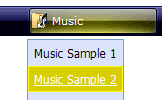
Click "Add button" and "Add submenu's item's buttons to create your menu.
You can use ready to use Templates. To do it just select theme you like in the "Button themes" and "Submenu themes" list. Then you can browse this theme's button backgrounds. When you find a button background or submenu theme you like, double-click it to apply.
Select vista button or submenu by clicking it and change button appearance for normal and mouse over states and set buttons/submenus link properties and link target attributes.
Save your menu as project file, as HTML page or insert your menu into the existing HTML page
COLLAPSIBLE MENUS JAVASCRIPT
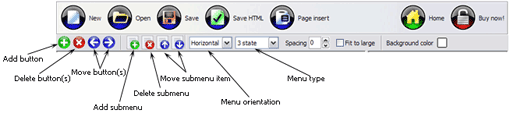
Button builder toolbar
New - to create new project.
Open - to open existing project.
Save - to save current project into the project file (*.xwb).
Save as� - to save current project into the project file (*.xwb) or into the HTML file or to save your project under another name. Choose type from the "File type" list in the "Save as�" dialog.
Page insert - to insert your menu into the existing web-page. "Build the menu into your page" dialog will appear. Click "Browse" button to choose a page you want to insert your menu into. After choosing a page and clicking Ok, the chosen page's HTML code will be opened in the Code field of the dialog.
After that, you can edit your code to prepare the page for the menu insertion. Normally, no coding is required. Then set the cursor to the line you want menu code to be inserted to and click the "Insert" button. The menu code will be inserted into the page. Then you can either save the page or close the dialog without saving by clicking "Save" or "Close" buttons.
Add button - to add website buttons to the menu.
Delete button(s) - to delete selected button(s). Is inactive if no button is selected. Move button(s) - to change selected button's order in the menu. Selected button(s) will be moved one position left/right each time you click one of the Move buttons.
Add submenu's item - to add submenu's item to the menu. Is inactive if no button is selected.
Delete button(s) - to delete selected submenu item(s). Is inactive if no button is selected.
Move submenu's item - to change selected submenu's item order in the menu. Selected item(s) will be moved one position up/down each time you click one of the submenu's item.
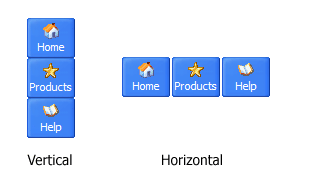
Menu orientation - to select menu orientation (vertical or horizontal). In vertical menu all website buttons are arranged in a column and have the same width. If the menu is horizontal then all its buttons are arranged in a row and have the same height.
Menu type - to select menu type (1-state, 2-state, 3-state and 3-state toggle).
1-state buttons are simple static image buttons. Example:
2-state buttons respond to mouseOver event creating rollover effect. Mouse click doesn't change the button appearance. Example:
3-state buttons support both mouseOver and mouseClick event. Example:
3-state toggle buttons additionally stick in the pressed state after a click. Example:
Spacing - to add space between all buttons.
Fit to large - to make all the menu buttons have the same size. The size will be automatically set to accommodate the biggest text and/or icon in the menu.
Background color - click the square to select Work area's background color.
DESCRIPTION
Sub menus dropdown over all the objects on the page (select, flash, object, embed).
Design personal styles for any submenu and item.
Use images for icons, backgrounds of items. Using images you can create menus entirely based on graphics.
Easy to Use
GUI interface to create your collapsible menus javascript menus easily and in no time
Sensible menu parameters for manual editing
Double Menus In Css
Easy, quick, professional
Its very easy to create professional high-quality web buttons with the help of JavaScript DropDown Menu. Once installed you�ll be making buttons for your web site with no programming or drawing required.
Css Script Layer
Ajax Dynamic Menu Css Templates Collapsible Menus Javascript
High Quality and Professional Results
You don�t have to know HTML, JavaScript, CSS or any other coding languages to make multi-state rollover web buttons, professional cross-browser, search engine friendly DHTML menus.
Vista Web Buttons will generate all necessary images, html, javascripts, css styles automatically!
RELATED
JavascriptCollapsibleMenu Template JavascriptCollapsibleMenu creacion de submenus con javascript. Create an effective web site navigation with Vista JavaScriptMenu!
CollapsibleJavascriptMenu How I can make a right click on collapsiblejavascriptmenu to save my target pdf file?
collapsiblemenus updated � Kae Verens <script type="text/javascript" src="cm.js"></script> And, with no extra work, you have a collapsiblemenu . Yes yes, I know its not new there are many people that do
DHTML Javascript Tree Menu. Deluxe Tree. v3.3 Deluxe Tree is cross-frame and cross-browser DHTML Javascript tree menu with a lot of powerful features, flexible parameters and easy installation.
CollapsibleMenus. Web Menu How To CollapsibleMenus. Keep your Web site clean and focused with JavascriptMenu Builder! How Clear Dropdownlist In Javascript
CollapsibleJavascriptMenu How I can make a right click on collapsiblejavascriptmenu to save my target pdf file?
CollapsibleJavascript Template CollapsibleJavascript Free Drop Down Menu Templates. Deluxe Menus. The most powerful JavaScriptMenu on the Web!
CollapsibleMenus. Web Menu How To CollapsibleMenus. Keep your Web site clean and focused with JavascriptMenu Builder! How Clear Dropdownlist In Javascript
CollapsibleMenus. Web Menu How To CollapsibleMenus. Keep your Web site clean and focused with JavascriptMenu Builder! How Clear Dropdownlist In Javascript
DHTML Javascript Tree Menu. Deluxe Tree. v3.3 Deluxe Tree is cross-frame and cross-browser DHTML Javascript tree menu with a lot of powerful features, flexible parameters and easy installation.
collapsiblemenus updated � Kae Verens <script type="text/javascript" src="cm.js"></script> And, with no extra work, you have a collapsiblemenu . Yes yes, I know its not new there are many people that do
CollapsibleMenuJavascript; Adobe Dreamweaver; MS Expression Web; ASP.net; Perl; Ruby on Rails; Advertise CollapsibleMenu. Posted by Anonymous on May 08th 2008 via (www.codingtuts.com)
CollapsibleMenuJavascriptCollapsibleMenuJavascript. Keep your Web site clean and focused by creating buttons!
CollapsibleMenu. Web Menu How To CollapsibleMenu. JavascriptMenu Builder. The most powerful DHTML Menu on the Web! Cool Dropdowm Menu
CollapsibleJavascriptMenu Template CollapsibleJavascriptMenujavascript rollover submenu best. Vista JavaScriptMenu is a versatile, ready-made solution that allows professional and amateur web
JavascriptCollapsibleMenuJavascriptCollapsibleMenu. Create professional DHTML/JavaScriptMenus for your Website with Web Menu Maker!
CollapsibleMenus. Web Menu How To CollapsibleMenus. Keep your Web site clean and focused with JavascriptMenu Builder! How Clear Dropdownlist In Javascript