Click "Add button" and "Add submenu's item's buttons to create your menu.
You can use ready to use Templates. To do it just select theme you like in the "Button themes" and "Submenu themes" list. Then you can browse this theme's button backgrounds. When you find a button background or submenu theme you like, double-click it to apply.
Select vista button or submenu by clicking it and change button appearance for normal and mouse over states and set buttons/submenus link properties and link target attributes.
Save your menu as project file, as HTML page or insert your menu into the existing HTML page
DROP DOWN MENU IN JAVASCRIPT
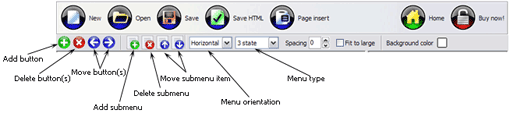
Button builder toolbar
New - to create new project.
Open - to open existing project.
Save - to save current project into the project file (*.xwb).
Save as� - to save current project into the project file (*.xwb) or into the HTML file or to save your project under another name. Choose type from the "File type" list in the "Save as�" dialog.
Page insert - to insert your menu into the existing web-page. "Build the menu into your page" dialog will appear. Click "Browse" button to choose a page you want to insert your menu into. After choosing a page and clicking Ok, the chosen page's HTML code will be opened in the Code field of the dialog.
After that, you can edit your code to prepare the page for the menu insertion. Normally, no coding is required. Then set the cursor to the line you want menu code to be inserted to and click the "Insert" button. The menu code will be inserted into the page. Then you can either save the page or close the dialog without saving by clicking "Save" or "Close" buttons.
Add button - to add website buttons to the menu.
Delete button(s) - to delete selected button(s). Is inactive if no button is selected. Move button(s) - to change selected button's order in the menu. Selected button(s) will be moved one position left/right each time you click one of the Move buttons.
Add submenu's item - to add submenu's item to the menu. Is inactive if no button is selected.
Delete button(s) - to delete selected submenu item(s). Is inactive if no button is selected.
Move submenu's item - to change selected submenu's item order in the menu. Selected item(s) will be moved one position up/down each time you click one of the submenu's item.
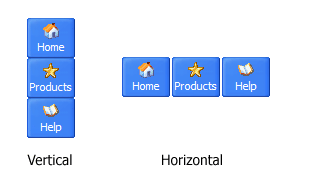
Menu orientation - to select menu orientation (vertical or horizontal). In vertical menu all website buttons are arranged in a column and have the same width. If the menu is horizontal then all its buttons are arranged in a row and have the same height.
Menu type - to select menu type (1-state, 2-state, 3-state and 3-state toggle).
1-state buttons are simple static image buttons. Example:
2-state buttons respond to mouseOver event creating rollover effect. Mouse click doesn't change the button appearance. Example:
3-state buttons support both mouseOver and mouseClick event. Example:
3-state toggle buttons additionally stick in the pressed state after a click. Example:
Spacing - to add space between all buttons.
Fit to large - to make all the menu buttons have the same size. The size will be automatically set to accommodate the biggest text and/or icon in the menu.
Background color - click the square to select Work area's background color.
DESCRIPTION
Sub menus dropdown over all the objects on the page (select, flash, object, embed).
Design personal styles for any submenu and item.
Use images for icons, backgrounds of items. Using images you can create menus entirely based on graphics.
Easy, quick, professional
Its very easy to create professional high-quality web buttons with the help of Java Script Drop Down Menu. Once installed you�ll be making buttons for your web site with no programming or drawing required.
Dhtml Select Floating
High Quality and Professional Results
You don�t have to know HTML, JavaScript, CSS or any other coding languages to make multi-state rollover web buttons, professional cross-browser, search engine friendly DHTML menus.
Vista Web Buttons will generate all necessary images, html, javascripts, css styles automatically!
Css Styled Submenu
Efectos Desplegables Con Javascript Drop Down Menu In Javascript
Easy, quick, professional
Its very easy to create professional high-quality web buttons with the help of JavaScript Drop Menu. Once installed you�ll be making buttons for your web site with no programming or drawing required.
RELATED
JavaScriptDrop-downMenusJavaScript can be used to make drop-downmenusJavaScript is frequently used for drop-downmenus, but they are usually badly implemented, and unusable if the user has an
How To Create JavascriptDropMenu How To Create JavascriptDropMenu. JavaScriptDropDownMenu. The most powerful JavaScriptMenu on the Web!
Dynamic Drive DHTML Scripts- Chrome CSS DropDownMenu Chrome Menu is a CSS and JavaScript hybrid dropdownmenu. It's easy to configure and search engine friendly. The main menu bar consist of a CSS list, while the drop
Longed-For Longed-For Multi-Level Drop-DownMenu Script. The main feature of this menu is the clear separation between the HTML code, software code and visual appearance.
HTML DropDownMenu Generator | ricocheting.com When and how to change the page Page changes when menu changes Use default text button. Use image button: Menu Properties Menu Name: (change menu name if multiple menus
javascriptdropdownmenuDropdownmenujavascriptdropdownmenu All trademarks and copyrights held by respective owners. Member comments are owned by the poster.
HTML DropDownMenu Generator | ricocheting.com When and how to change the page Page changes when menu changes Use default text button. Use image button: Menu Properties Menu Name: (change menu name if multiple menus
Dropdownmenu with images - JavaScript / DHTML / AJAX I have written a script for a dropdownmenu on my site which on mouse over the menu item changes from blue to yellow and show the dropdown item but now I'm stuck,i
JavaScript Codes: Dropdownmenu list The JavaScript Source is your resource for thousands of free JavaScripts for cutting and pasting into your Web pages. Get free Java Script tutorials, references, code
HTML DropDownMenu Generator | ricocheting.com When and how to change the page Page changes when menu changes Use default text button. Use image button: Menu Properties Menu Name: (change menu name if multiple menus
A Simple JavaScriptDrop-downMenu Shows you how to use JavaScript and a SELECT list to create a simple drop-down navigation menu for your website.
Javascript Navigation Simple Drop-DownMenu Tutorial This clean-looking menu is very simple to implement and can be placed anywhere on a page. Adding or deleting levels is easy to do. The menu is created without tables
Ultimate DropDownMenu: Accessible JavascriptMenu by UDM is a fully-featured and accessible website menu, which provides useable content to all browsers - including screenreaders, search-engines and text-only browsers.
Longed-For Longed-For Multi-Level Drop-DownMenu Script. The main feature of this menu is the clear separation between the HTML code, software code and visual appearance.
DropDownMenu This script generates a dropdownmenu at the top of your pages for site navigation.