Click "Add button" and "Add submenu's item's buttons to create your menu.
Create your own buttons or use ready to use Templates.
Select vista button or submenu by clicking it and change button appearance for normal and mouse over states and set buttons/submenus link properties and link target attributes.
Save your menu as project file, as HTML page or insert your menu into the existing HTML page
HOW TO CREATE HOVER MENU
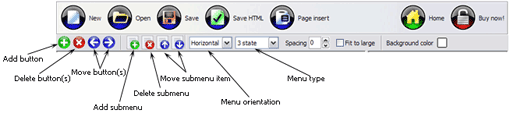
Button builder toolbar
New - to create new project.
Open - to open existing project.
Save - to save current project into the project file (*.xwb).
Save as� - to save current project into the project file (*.xwb) or into the HTML file or to save your project under another name. Choose type from the "File type" list in the "Save as�" dialog.
Page insert - to insert your menu into the existing web-page. "Build the menu into your page" dialog will appear. Click "Browse" button to choose a page you want to insert your menu into. After choosing a page and clicking Ok, the chosen page's HTML code will be opened in the Code field of the dialog.
After that, you can edit your code to prepare the page for the menu insertion. Normally, no coding is required. Then set the cursor to the line you want menu code to be inserted to and click the "Insert" button. The menu code will be inserted into the page. Then you can either save the page or close the dialog without saving by clicking "Save" or "Close" buttons.
Add button - to add website buttons to the menu.
Delete button(s) - to delete selected button(s). Is inactive if no button is selected. Move button(s) - to change selected button's order in the menu. Selected button(s) will be moved one position left/right each time you click one of the Move buttons.
Add submenu's item - to add submenu's item to the menu. Is inactive if no button is selected.
Delete button(s) - to delete selected submenu item(s). Is inactive if no button is selected.
Move submenu's item - to change selected submenu's item order in the menu. Selected item(s) will be moved one position up/down each time you click one of the submenu's item.
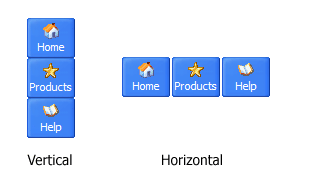
Menu orientation - to select menu orientation (vertical or horizontal). In vertical menu all website buttons are arranged in a column and have the same width. If the menu is horizontal then all its buttons are arranged in a row and have the same height.
Menu type - to select menu type (1-state, 2-state, 3-state and 3-state toggle).
1-state buttons are simple static image buttons. Example:
2-state buttons respond to mouseOver event creating rollover effect. Mouse click doesn't change the button appearance. Example:
3-state buttons support both mouseOver and mouseClick event. Example:
3-state toggle buttons additionally stick in the pressed state after a click. Example:
Spacing - to add space between all buttons.
Fit to large - to make all the menu buttons have the same size. The size will be automatically set to accommodate the biggest text and/or icon in the menu.
Background color - click the square to select Work area's background color.
DESCRIPTION
Good menu is an essential part of website commercial success. If people can't find their way around the site, they will fast give up seeking and retire, never to return. So, it's extreme serious that your website has a accurate, precise, prompt, and navigation of immaculate appearance. Don't let your web site guests to get lost. Try JavaScript Drop Menu!
Instant preview
Each change of button-menu appearance is instantly displayed in the Preview Window.
At the same time, you will be able to test how the buttons would respond to the mouse events.
Dynamic Position Js
Instant preview
Each change of button-menu appearance is instantly displayed in the Preview Window.
At the same time, you will be able to test how the buttons would respond to the mouse events.
Css Menus Cross Browser
Dropdown Mit Hintergrundfarben Mouseover How To Create Hover Menu
Fully Customizable
Every button or menu parameter can be easily customized in JavaScript DropDown Menu to fit your web site design and your needs.
Create your very own html menus, as simple or as complex as you want!
How to CreateHover Text in Dreamweaver MX | eHow.com Dreamweaver MX is a popular HTML editor and web page building application with a wide variety of capabilities. Hover text is one of the features you can create with
TIP: Navigation Component HoverMenus I've posted an article outlining how to make your Navigation Components have hovermenus. http://danielinsley.com/entries/general/ over-menus
Javascript Hover Template Javascript Hover 3 Drop Down Jump Menu. Make professional DHTML/Java Script Menus for your web site with Deluxe Menu!
HoverMenu Sample Fix bugs: Make sure it works: 6 OnShow - The OnShow animation will be played each time the hovermenu is displayed.
How to CreateHover Text in Dreamweaver MX | eHow.com Dreamweaver MX is a popular HTML editor and web page building application with a wide variety of capabilities. Hover text is one of the features you can create with
HoverMenuCreate a hovermenu that sits in the bottom right corner of the browser window
HoverMenu In Ajax HoverMenu In Ajax. Create excellent html drop down menus and web buttons with minimum effort!
Uncle Jims Javascript Designs: HOVERMENU Configuring the menu: The above code illustrates what must be done to transform your menu links into a hover-up bar. Firstly, create a DIV with the following codes inside
Javascript Hover Template Javascript Hover 3 Drop Down Jump Menu. Make professional DHTML/Java Script Menus for your web site with Deluxe Menu!
HoverMenu In Ajax HoverMenu In Ajax. Create excellent html drop down menus and web buttons with minimum effort!
Create a Vertical Scrolling Menu with CSS and jQuery Create a Vertical Scrolling Menu with CSS and jQuery. After creating a horizontal scrolling menu, I also added the title attribute to each link to show a tooltip on hover
HoverMenu in asp.net - ASP.NET Hello, How to createhovermenu. I want to create exactly as attached in the picture. When i mouse over the attendance, the menu should be displayed as such in the
How to make a simple CSS dropdown menu | evolt.org Unfortunately, this only works on browsers that can render hover styles on markup, CSS for formatting, and minimal DOM-compliant JavaScript to create a drop-down menu.
HoverMenuCreate a hovermenu that sits in the bottom right corner of the browser window
Create a Vertical Scrolling Menu with CSS and jQuery Create a Vertical Scrolling Menu with CSS and jQuery. After creating a horizontal scrolling menu, I also added the title attribute to each link to show a tooltip on hover
Uncle Jims Javascript Designs: HOVERMENU Configuring the menu: The above code illustrates what must be done to transform your menu links into a hover-up bar. Firstly, create a DIV with the following codes inside
Uncle Jims Javascript Designs: HOVERMENU Configuring the menu: The above code illustrates what must be done to transform your menu links into a hover-up bar. Firstly, create a DIV with the following codes inside
How to CreateHover Text in Dreamweaver MX | eHow.com Dreamweaver MX is a popular HTML editor and web page building application with a wide variety of capabilities. Hover text is one of the features you can create with
Create a Vertical Scrolling Menu with CSS and jQuery Create a Vertical Scrolling Menu with CSS and jQuery. After creating a horizontal scrolling menu, I also added the title attribute to each link to show a tooltip on hover
HighOnCoding.com: Creating a GridView HoverMenuCreating a GridView HoverMenu Abstract: So, what are we talking about here? Let's say we have a gridview and have some command fields inside the grid, like Edit, Delete
HoverMenu in asp.net - ASP.NET Hello, How to createhovermenu. I want to create exactly as attached in the picture. When i mouse over the attendance, the menu should be displayed as such in the
Control API for HoverMenu (hoverMenu) Control API for HoverMenu (hoverMenu) A control to create a hovermenu. A hovermenu works like a pop up menu in a desktop application.
GridView HoverMenu - CodeProject This will make sure the script doesn't blow up. Now, when you hover over each row, you can have menu specific items inside your DIV popup. Since I am also passing e.Row to